30 Zendesk Questions, Answered
Zendesk is a customer service platform that teams use to handle support tickets, conversations, and self-service in one ...
ReadResolution Learning Loop is Zendesk's term for how its platform improves with every interaction. What Zendesk includes in it, and the weekly cycle around it.
 L5 Team
Resolution Learning Loop™ is Zendesk's term for the way its platform learns from every interaction and applies that learning to the next one. Zendesk builds the loop into the product and keeps a person in the approval path by design. Getting a rising automated resolution rate out of it is operating work: review what the platform surfaces, approve the fix or send it back, decide which gaps are workflow rather than knowledge, then re-measure.
Most support teams treat AI setup as a project. Connect the AI agent, point it at the help center, publish, and move on. The platform keeps surfacing what to fix, and the recommendations sit unread because reviewing them belongs to nobody. The resolution rate then tracks the knowledge and the workflows that nobody has updated.
This page covers two layers. First, what Zendesk means by the Resolution Learning Loop and which parts of the platform carry it. Then the weekly cycle a service team runs on top of it, because the platform surfaces the gap and a person still has to decide what to change. The platform mechanics come from Zendesk's own documentation and announcements, linked throughout. The operating cadence is how L5 runs it in production.
The term belongs to Zendesk, which marks it Resolution Learning Loop™ in its own material. Zendesk introduced the Resolution Platform at Relate 2025 and expanded it at Relate 2026, where the loop was named as the mechanism that makes AI agents and copilots better with every interaction rather than static after go-live.
In Zendesk's description, interaction data from tickets, conversations, and connected systems feeds Zendesk AI, which analyzes quality signals and outcomes to find where performance, knowledge, or workflows fall short. Copilots and builders then deploy the fix without code: Admin Copilot recommends the change, Knowledge Builder drafts the content behind it, Action Builder assembles the workflow, App Builder puts it in the agent interface. The next interaction starts from the improved state.
Availability is worth checking before you design a process around any single piece. Zendesk listed Admin Copilot and knowledge connectors as generally available at Relate 2026, with Agent Builder, Knowledge Copilot, Analyst Copilot, and agentic analytics in early access. Early access behavior and plan requirements change.
This article is L5's explainer for teams running Zendesk in IT and HR service delivery. It is not Zendesk documentation, and nothing here changes Zendesk's own definition. The rest of the page covers what the loop asks of the people operating it.
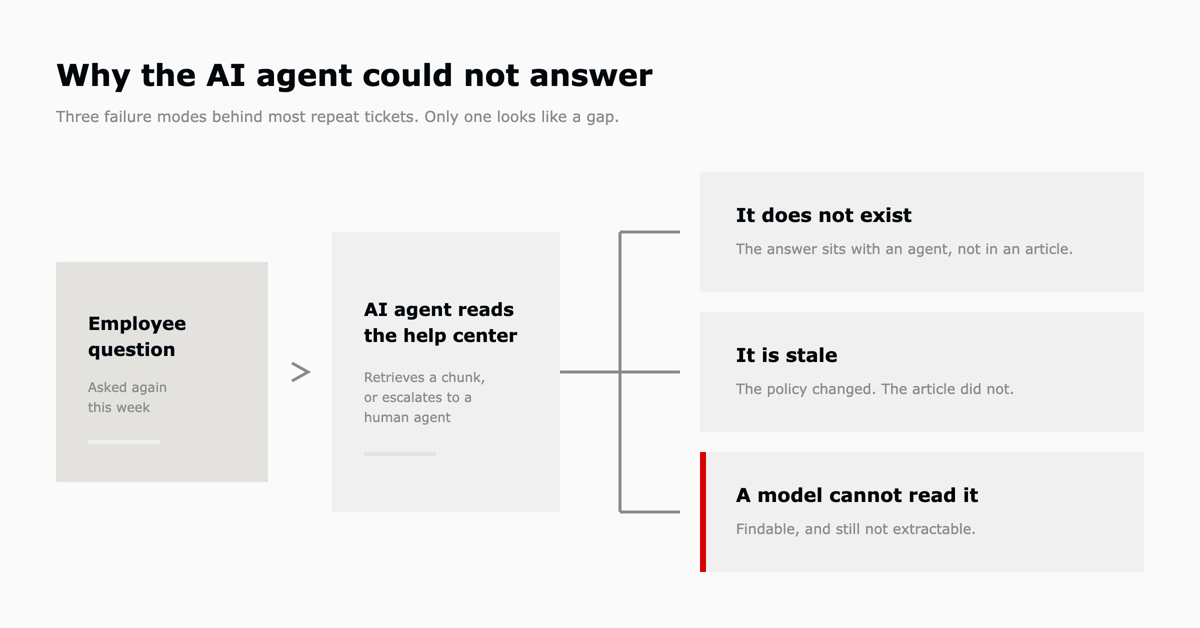
A repeat ticket is a question your service desk has already answered, arriving again because the answer was never written down where the AI agent or the employee could find it. Three causes account for most of the volume.
The knowledge does not exist. The answer lives in an agent's head, a Slack thread, or a macro that only a human can trigger. The AI agent has nothing to retrieve, so it escalates, and the next identical request escalates too.
The knowledge exists but is stale. A policy changed, a system was replaced, or a step now requires a different approval. The article still resolves the ticket in the AI agent's judgment, so the conversation closes and the employee opens a new one.
The knowledge exists but is unreadable to a model. Zendesk's own guidance on this is specific: content should be self-contained with few external links, define terminology and spell out acronyms on first use, avoid vague pronouns like "it" and "they" in favor of repeating the noun, use headings and lists rather than nested sub-steps, and describe any image or diagram in text because generative AI interprets text only. Zendesk also advises repeating the question or topic from the title inside the body, because articles are chunked before retrieval and a chunk that has lost its context is harder to match. Complex tables are discouraged for the same reason.
The third cause is the one teams miss. The article is present, the search finds it, and the AI agent still cannot produce an answer from it.
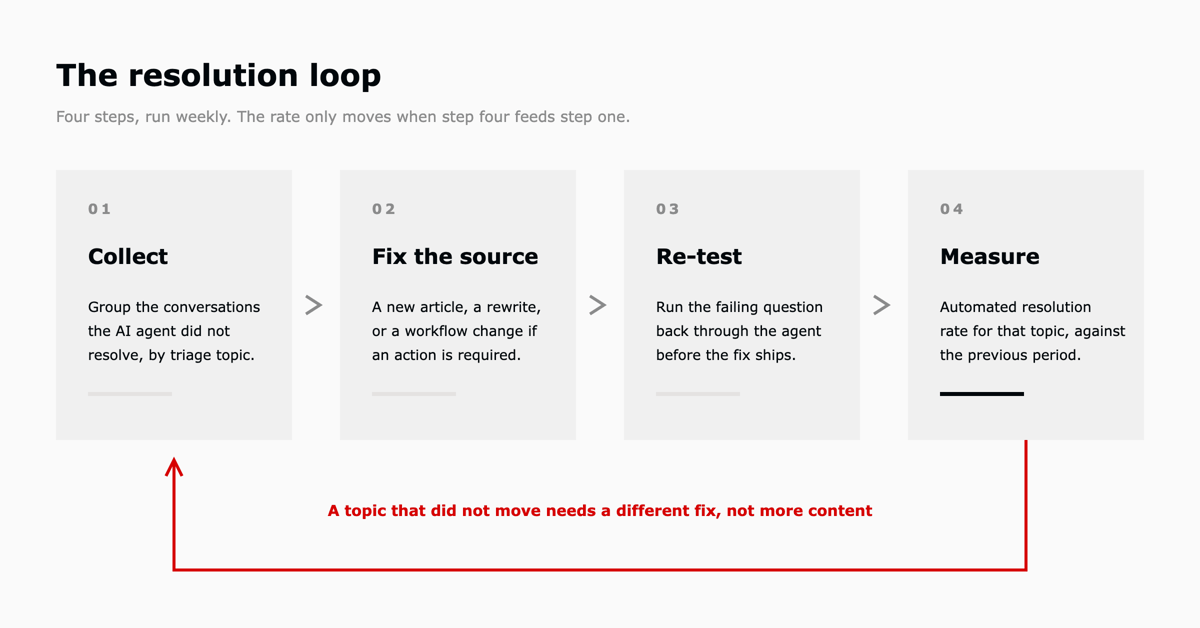
Zendesk's loop supplies the evidence and the tooling. The decisions stay with the service team: which gap to fix first, whether the fix is content or a workflow, and whether the change worked. L5 runs that as four steps on a fixed cadence rather than when someone notices a problem. Zendesk's own guidance for raising the rate runs in the same order: centralize the knowledge, connect the systems so the AI can take action, expand by process starting with high-volume requests, then monitor the result on a regular cadence with quality assurance in place.
| Step | What happens | Output |
|---|---|---|
| 1. Collect the failures | Pull the conversations where the AI agent did not produce an automated resolution, grouped by the topic that intelligent triage assigned. Volume by topic tells you which gap costs the most. | A ranked list of unresolved topics |
| 2. Fix the source | For each topic, decide whether the fix is a new article, a rewrite of an existing one, or a workflow change. A request that needs an action taken in another system is not a knowledge gap and will not be solved by writing more content. | Published or revised knowledge, or a new automation |
| 3. Re-test before release | Run the original failing questions back through the AI agent and confirm the new content produces the answer. Testing in Admin Center does not count toward automated resolutions, so this is free to do. | Confirmed answer, or a second revision |
| 4. Measure the change | Compare automated resolution rate for that topic against the previous period. A topic that did not move needs a different fix, not more content. | A number that either moved or did not |
The order matters more than the labels. Teams that skip step 3 publish content that reads well to a human and still fails retrieval. Teams that skip step 4 accumulate articles with no evidence that any of them changed the outcome.
Most of this is already in the platform, which is the point of building the loop into it. The gap is usually that nobody has been assigned to run the cycle around it.
| Step | Feature | Availability |
|---|---|---|
| Classify incoming volume | Intelligent triage: topic, sentiment, language, and custom entities written to ticket fields automatically on public comment | Suite and Support Professional and above; using classifications inside workflows requires the Copilot add-on |
| Find the next topic worth automating | Automation potential report, which analyzes your own conversations and shows how an AI agent would respond to them | Included with all Suite and Support plans at no extra cost |
| Spot content gaps and draft fixes | Knowledge copilot: flags gaps from ticket data, drafts articles, reports coverage, freshness, and AI readability weekly | Early Access Program. Professional, Enterprise, or Enterprise Plus, with Support admin and Knowledge admin roles |
| Measure the result | Automated resolutions, verified per conversation by an LLM at session end | All AI agent plans |
Knowledge copilot is in Early Access, so treat its behavior and plan requirements as subject to change. Everything it produces lands as a draft for a human to approve, which is the intent: it accelerates step 2 without removing the reviewer.
Automated resolution is the metric to anchor on, because Zendesk defines it narrowly and verifies each one per conversation. A resolution counts when the issue is resolved without live-agent intervention and an LLM verifies the reply was relevant. On messaging, the conversation also has to survive 72 hours without an agent escalation. On email, no human agent can have responded. Escalations do not count. Neither do internal notes, sandbox activity, flows that link to other flows, or Admin Center testing.
That definition rules out the two numbers teams usually report instead. Deflection rate counts a self-service view whether or not the person got what they needed. Containment rate counts a conversation that never reached a human, including the ones where the employee gave up. Both can rise while the experience gets worse. Zendesk argues the same case in its own comparison of deflection and resolution, where it warns that a high deflection rate can hide unresolved issues and customers who gave up.
There is no universal benchmark for a good automated resolution rate, and the third-party figures in circulation vary widely by industry and channel. Set your own baseline in the first full month after go-live, then track the trend per topic. A rate that climbs while escalations on the same topic fall is the signal that the loop is working. A flat rate after three cycles means the fixes are aimed at the wrong thing.
Measure the trend per topic. An account-wide rate can hold steady while your highest-volume topic degrades underneath it.
Nobody owns it. Implementation ends and nobody picks up the operating cycle. Support leadership owns the queue, IT owns the platform, and the knowledge base has no editor. The cycle needs one named owner with time allocated to it, weekly.
The fix is aimed at content when the problem is process. Password resets, access requests, and equipment orders need an action in another system. Writing an article about how to request access does not resolve the request. Those topics need an integration or a workflow, and they will drag the resolution rate down until they get one.
Volume is too low to read. A topic with four tickets a month will not produce a reliable signal. Group small topics until the volume supports a decision, and accept that the long tail stays with human agents.
The measurement window is too short. Messaging resolutions evaluate at session end, and email resolutions are assessed after 72 hours. Reading last week's rate on Monday morning gives you an incomplete number.
This is operating work, and it does not stop. Someone reviews the unresolved conversations, decides what to change, makes the change, tests it, and reports what moved. That happens every week, against a target set in advance.
That is the gap most companies hit after go-live. The platform is live, the AI agent is answering, Zendesk is surfacing what to fix, and the review that turns those recommendations into approved changes has no owner. Fewer than 10% of L5's 600+ customers reach an operated state without someone actively running it. What AI-operated IT support actually looks like covers the operating model in more detail, and 30 Zendesk questions, answered covers the platform mechanics underneath it.
L5 is Zendesk's Preferred Partner for IT and HR service management. An assessment tells you where your automated resolution rate stands today and which topics are worth fixing first. After that, L5 runs the cycle every week and reports what changed on a scorecard.

An automated resolution is counted when a customer's issue is resolved without live-agent intervention and an LLM verifies the reply was relevant. On messaging channels the conversation also has to pass 72 hours without an agent escalation. On email and web forms, no human agent can have responded. Resolutions are measured per conversation rather than per user.
Testing through Admin Center, Answer Bot for Slack, the Article Recommendation API, flows that link to other flows, sandbox activity, escalations to a human agent, and email replies that only add an internal note.
Group unresolved tickets by topic, fix the knowledge or the workflow behind the largest group, re-test the original question against the AI agent before release, then compare the automated resolution rate for that topic against the prior period. Repeat on a weekly cadence. Publishing more articles without measuring which ones changed the outcome does not reduce repeats.
Ticket deflection is a request that is answered by self-service or an AI agent instead of reaching a human. It is a weaker measure than automated resolution, because a deflection can be counted when someone views an article and still does not get an answer.
No. Deflection rate counts requests that did not reach an agent. Automated resolution rate counts conversations where the issue was actually resolved and a model verified the answer was relevant. A team can raise deflection by making it harder to reach a human, which lowers real resolution at the same time.
Usually the article is written for a human reader rather than for retrieval. Zendesk's guidance is to make each article self-contained, define terms and expand acronyms on first use, repeat the noun instead of using "it" or "they", repeat the question or topic from the title in the body so chunks keep their context, describe images in text, and avoid complex tables.
Weekly for the review and the fixes, with the measurement read on a lag because messaging resolutions evaluate at session end and email resolutions are assessed after 72 hours. Monthly is long enough for a bad topic to cost real agent hours before anyone sees it.
The automation potential report is included with all Suite and Support plans. Intelligent triage classifications require Suite or Support Professional and above, and using those classifications inside a workflow requires the Copilot add-on. Knowledge copilot is in Early Access and requires Professional, Enterprise, or Enterprise Plus.
Yes. The cycle is the same for employee HR requests: classify the incoming volume, find the topics the AI agent could not resolve, fix the policy content or the workflow behind them, and re-measure. HR knowledge tends to change more often than IT knowledge, which makes the freshness step matter more.
Last verified August 2026. Resolution Learning Loop, Resolution Platform, Zendesk, and Zendesk product names are trademarks of Zendesk, Inc. L5 is a Zendesk Preferred Partner. This article is L5's own explainer and is not Zendesk documentation. Platform behavior, plan requirements, and early access status are Zendesk's to change, so verify against Zendesk's documentation before you rely on any of it.
The full article with its figures, tables and sources, set for reading offline, printing, and sharing.
On its way to your inbox You can also download it right now.
Download the PDF Last updatedKeep reading
Zendesk is a customer service platform that teams use to handle support tickets, conversations, and self-service in one ...
Read
Zendesk implementation, sometimes sold as implementation services or Zendesk consulting, is the work of configuring Zend...
Read
The Short Version Zendesk, NinjaOne, and L5 have launched a unified IT Service and Endpoint Management solution on AWS M...
ReadField notes on AI operations and service management, direct to your inbox. New insights, the week we publish them.
No spam. Unsubscribe any time.