Zendesk Implementation vs Managed Services: What Each Covers
Zendesk implementation, sometimes sold as implementation services or Zendesk consulting, is the work of configuring Zend...
ReadStraight answers to the 30 questions buyers ask most about Zendesk: what it is, pricing, AI agents, how it compares to ServiceNow and Freshdesk, and implementation.
 L5 Team
Zendesk is a customer service platform that teams use to handle support tickets, conversations, and self-service in one place, and increasingly to run internal IT and HR service too. That range is why the same questions come up over and over in buyer research.
This page answers the thirty most common ones, grouped into five areas: what Zendesk is, pricing and plans, features and AI, how it compares to other tools, and what implementation involves. Each answer is short and stands on its own, so you can start anywhere and read only what you need.
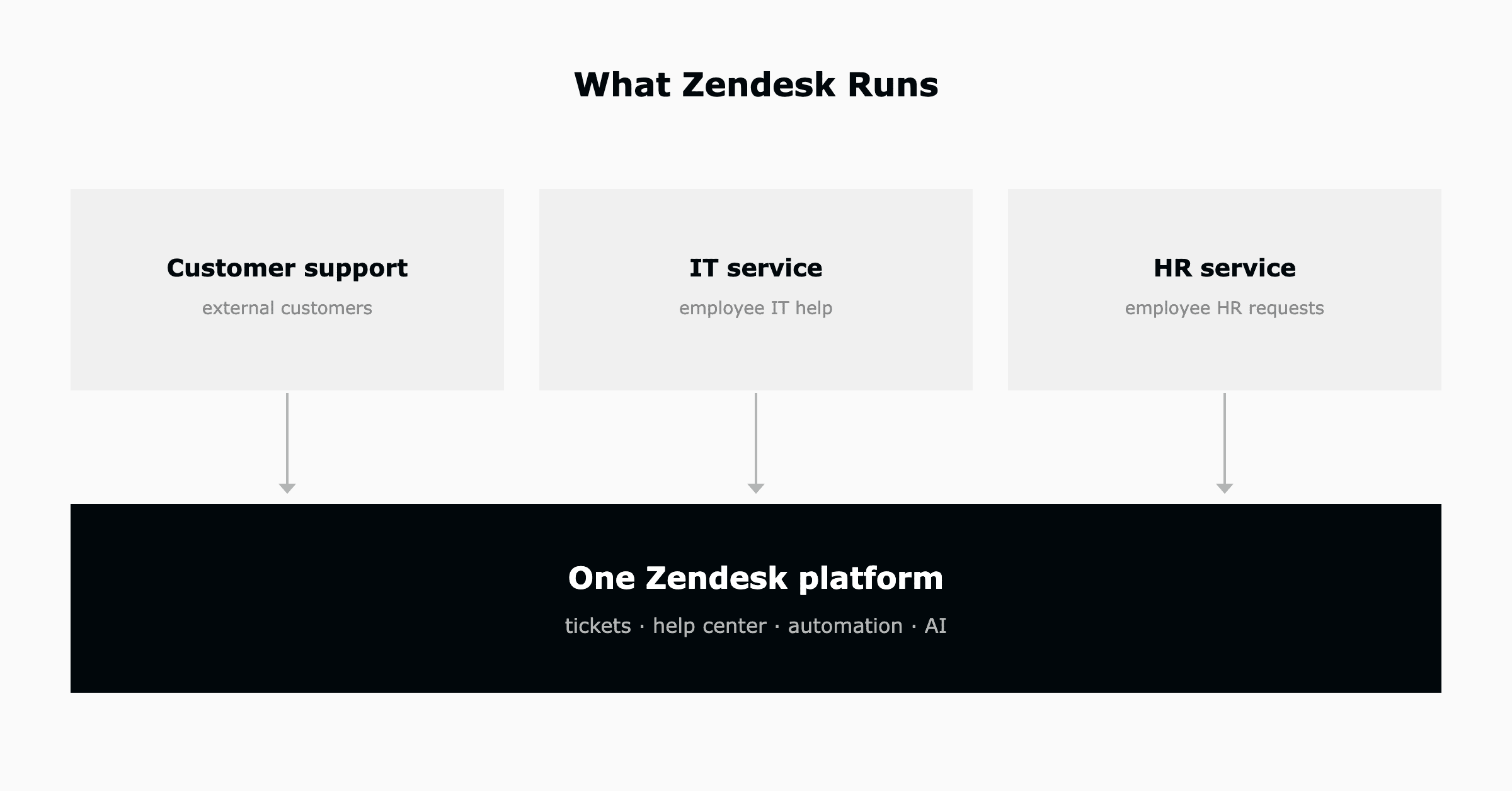
Zendesk is a customer service and support platform used to manage tickets, conversations, and a help center in one place. Teams use it to handle questions across email, chat, phone, and messaging, and increasingly to run internal IT and HR support as well.
Zendesk started in customer support but is widely used for internal service too. The same ticketing, help center, and automation power employee-facing IT help desks and HR service delivery, so one platform can serve both customers and staff.
The core is Zendesk Support for ticketing. Around it sit Guide for the help center and knowledge base, messaging and live chat, Talk for voice, Explore for analytics, and Zendesk AI for AI agents and agent copilot. The Zendesk Suite bundles these together.
Zendesk fits support, IT, and HR teams from small businesses to enterprises, and is especially common in the mid-market. It suits teams that want a fast-to-deploy platform for high-volume conversations without the overhead of a heavy enterprise suite.
A ticket is the record of a single customer or employee request, holding the full conversation, status, priority, assignee, and history. Every email, chat, or form submission becomes a ticket so nothing gets lost across channels.
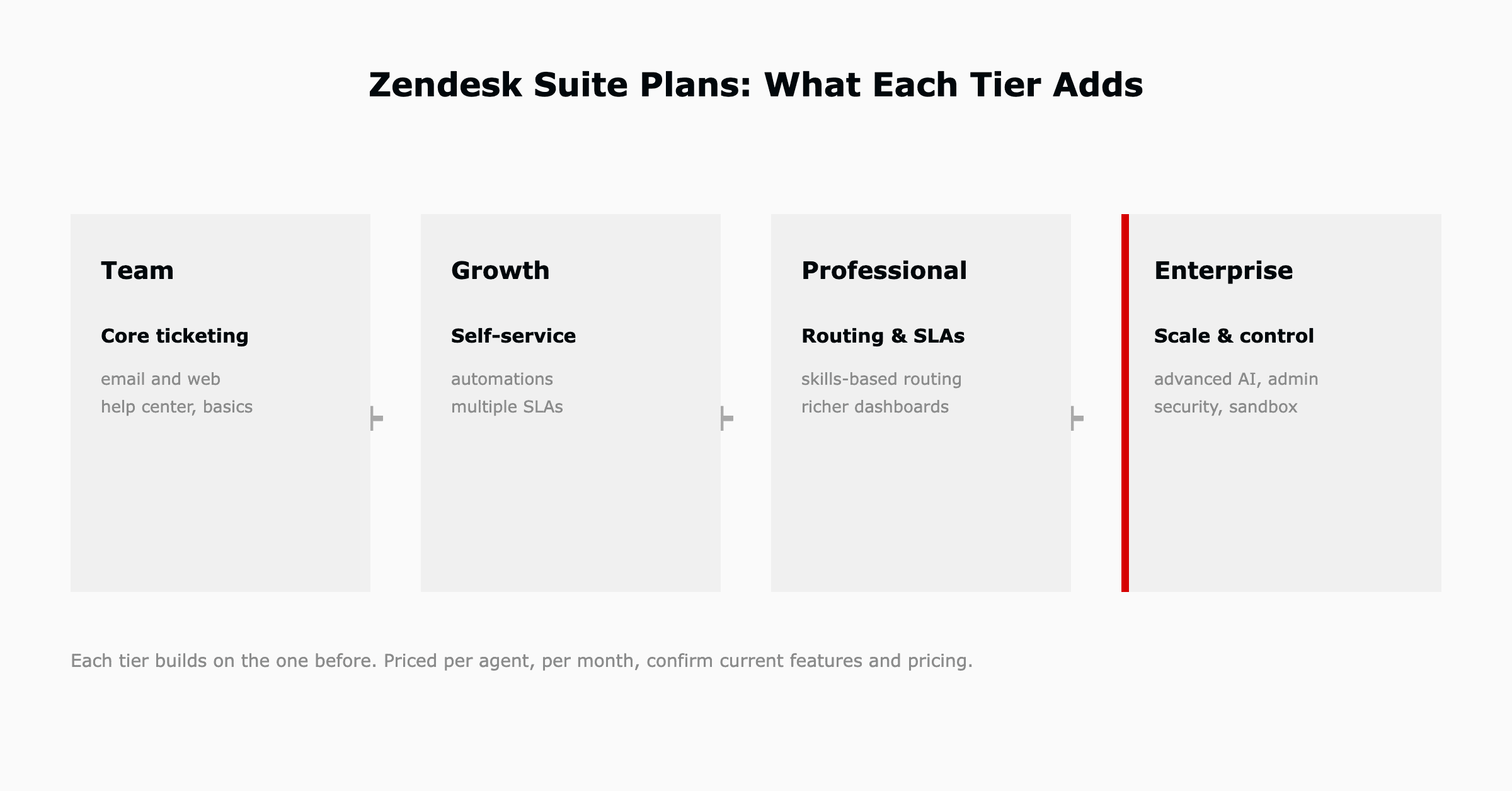
Zendesk pricing is per agent per month, with tiers that scale in features and automation. Pricing changes over time, so confirm current figures on Zendesk's pricing page before you budget.
The Zendesk Suite comes in tiers, commonly Team, Growth, Professional, and Enterprise, each adding automation, routing, and AI capability. Higher tiers unlock more advanced workflows, reporting, and administration.
Zendesk offers a free trial so teams can evaluate the full platform before buying. Plan the evaluation around a real use case to get the most from it.
Zendesk AI, including AI agents, is generally priced as an add-on or by automated resolutions rather than bundled into every plan. Because Zendesk's AI capabilities are evolving quickly, confirm the current model and eligibility with Zendesk.
Support is the standalone ticketing product. The Suite bundles Support with messaging, help center, voice, and analytics in one plan. Most teams that want omnichannel service choose the Suite rather than assembling products separately.
Mid-market teams usually land on a mid or upper Suite tier, where automation, routing, and AI become available. The right tier is driven by ticket volume and how much automation and reporting a team needs, not headcount alone.
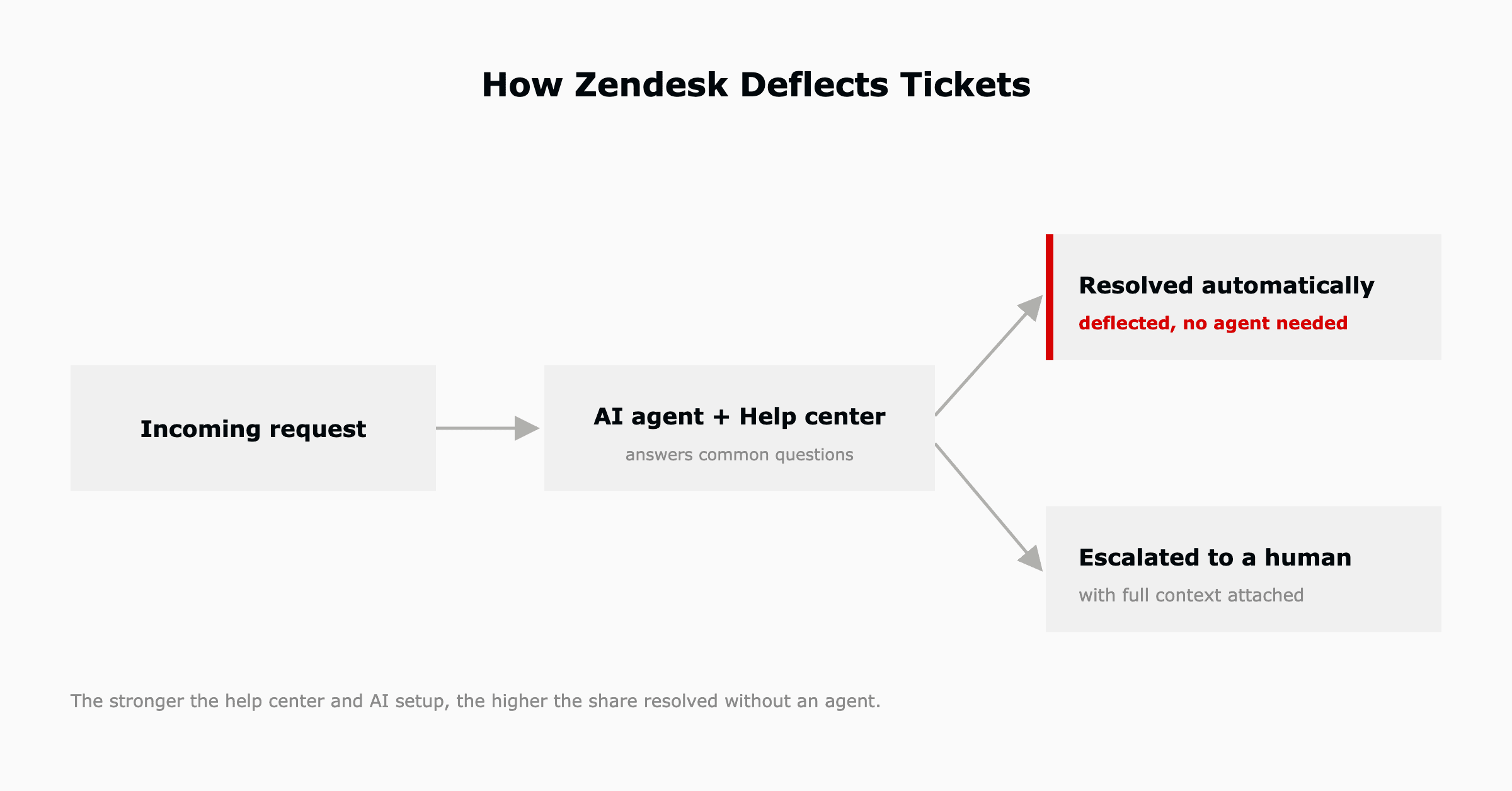
Zendesk AI agents are automated agents that resolve customer and employee requests end to end, not just suggest answers. They handle common questions across chat and email, escalate the rest to a human, and are central to Zendesk's ticket-deflection strategy. Raising the share they resolve over time is the job of Zendesk's Resolution Learning Loop and the weekly review cycle around it.
Deflection resolves requests before they reach a human, using AI agents and a well-structured help center to answer common questions automatically. The better the knowledge base and AI configuration, the higher the share of tickets resolved without an agent.
Zendesk Guide is the help center and knowledge base where customers and employees find answers themselves. It powers self-service and feeds the AI agents, so a strong help center directly raises deflection and lowers ticket volume.
Yes. Triggers act on tickets in real time, automations run on time-based conditions, and macros apply canned responses and actions in one click. Together they route, update, and respond to tickets without manual steps.
Yes. Zendesk Explore provides dashboards and reporting on volume, resolution time, SLAs, CSAT, and agent performance. Leaders use it to see where backlogs build and where automation would help most.
Yes. Zendesk has native integrations and a large marketplace covering Slack, Jira, Salesforce, and hundreds of other apps, plus an API. Most common tools connect without custom development.
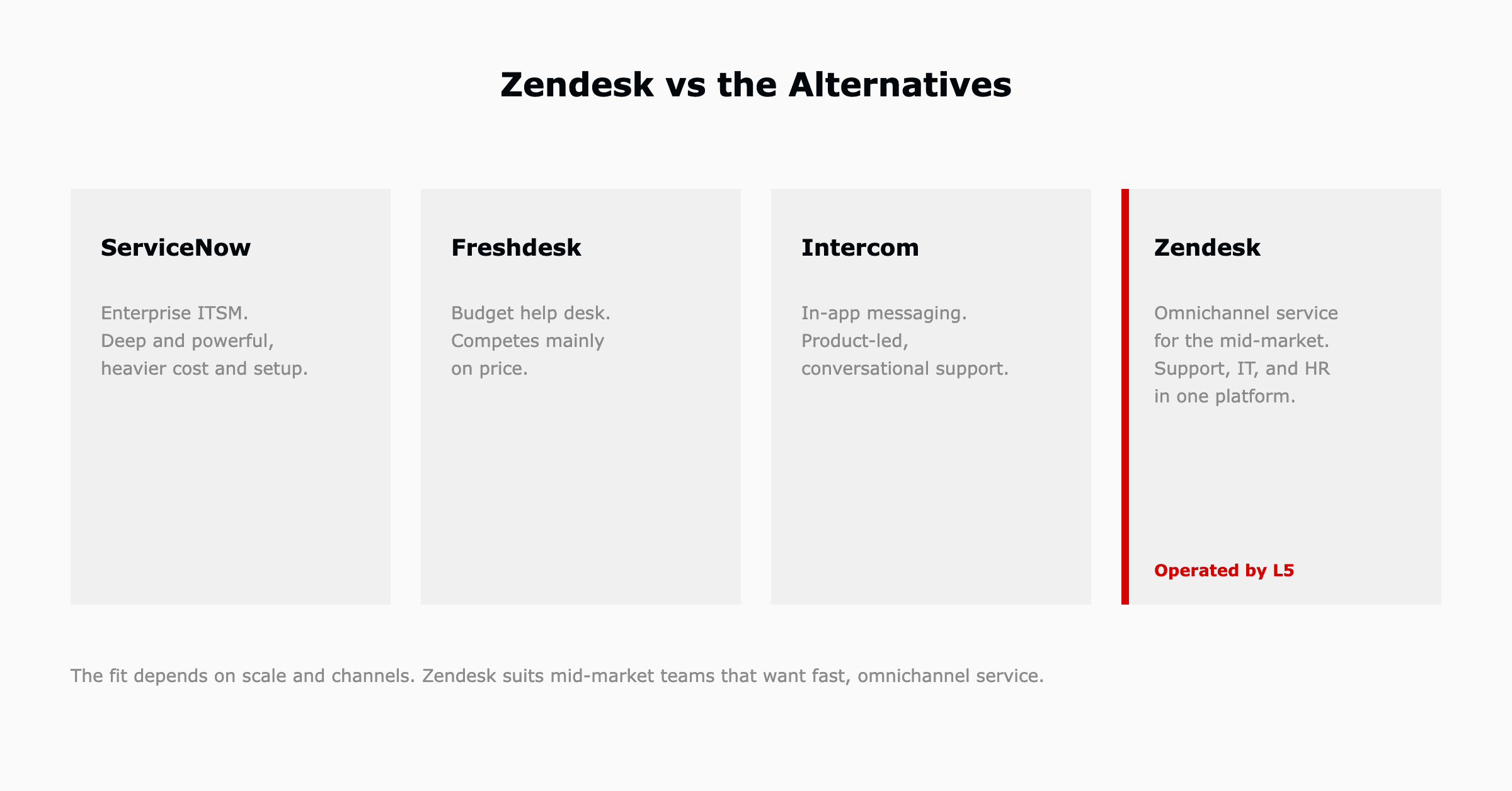
Both are help desk platforms aimed at similar buyers. Zendesk tends to lead on ecosystem breadth, enterprise scale, and AI maturity, while Freshdesk often competes on price. The right choice depends on volume, channels, and how much you rely on the app marketplace.
Intercom leans toward in-app messaging and product-led, conversational support. Zendesk is a broader omnichannel service platform covering email, phone, and a full help desk. Teams wanting ticketing plus a help center across channels usually fit Zendesk better.
Yes. Zendesk runs internal IT help desks well, with an employee portal, request forms, SLAs, and automation. It gives IT a fast path to structured service management and pairs with AI agents to deflect routine employee questions.
Basic Zendesk is quick to stand up. The depth, configuring triggers, SLAs, routing, a strong help center, and AI, is where most of the value comes from, and a structured rollout turns a working inbox into full service management.
Yes. The Zendesk Suite is commonly used to replace a separate ticketing tool, live chat, help center, and reporting stack with one platform. It does not replace systems of record like a CRM or HRIS, but it consolidates the service layer.

A Zendesk implementation partner configures the platform around a team's real workflow: ticket routing, SLAs, triggers, the help center, integrations, and AI agents, then trains the team. The difference between partners is usually what happens after go-live, whether they stay involved or hand off and leave.
It depends on channels, integrations, and how much automation is in scope. A focused rollout can go live quickly when scope is defined up front, while enterprise migrations take longer. Defining outcomes before the build is what keeps the timeline short.
A small team with simple needs can set Zendesk up itself. A partner makes sense when the rollout spans channels, integrations, ITSM or HR workflows, or AI agents, because a partner who has done it before avoids the routing and configuration mistakes that are expensive to unwind later.
Ongoing work, tuning automations, maintaining the help center, and improving AI agents, has no default owner once a rollout ends. L5 operates Zendesk on a weekly cadence after go-live rather than treating go-live as the finish line.
A Zendesk consultant advises on how to configure and use Zendesk for a team's goals, from workflow design to AI and reporting. The most useful ones do not just advise, they implement and then operate the platform against measurable outcomes.
L5 implements and operates Zendesk AI for IT and HR service management, configuring the platform around how a team works and then running it on a weekly cadence so it keeps improving. That operate model is the difference between a Zendesk that is set up once and one that keeps deflecting tickets and hitting SLAs.

The full article with its figures, tables and sources, set for reading offline, printing, and sharing.
On its way to your inbox You can also download it right now.
Download the PDF Last updatedKeep reading
Zendesk implementation, sometimes sold as implementation services or Zendesk consulting, is the work of configuring Zend...
Read
Nobody writes a post-mortem for a slowly declining deflection rate. There is no incident when an AI agent's routing accu...
Read
Resolution Learning Loop™ is Zendesk's term for the way its platform learns from every interaction and applies that lear...
ReadField notes on AI operations and service management, direct to your inbox. New insights, the week we publish them.
No spam. Unsubscribe any time.