ClickUp Migration: 6 Steps and What Importers Leave Behind
Migrating to ClickUp has two halves. ClickUp's native importers move your tasks, comments and attachments across from As...
ReadWhat ClickUp's Jira importer transfers and what it drops, the hierarchy decision you make once, and the agile setup you rebuild after the import.
 L5 Team
ClickUp's Jira importer moves projects, issues, subtasks, comments, attachments, dependencies and statuses across, and it lets you map Jira statuses, custom fields and users during the import. It does not move recurring tasks, the Priority field, links between tasks, or any custom field you defined yourself, and it turns private Jira comments into public ClickUp comments. This guide covers what transfers, what breaks, the one hierarchy decision you make before the import runs, and the agile setup you rebuild afterwards.
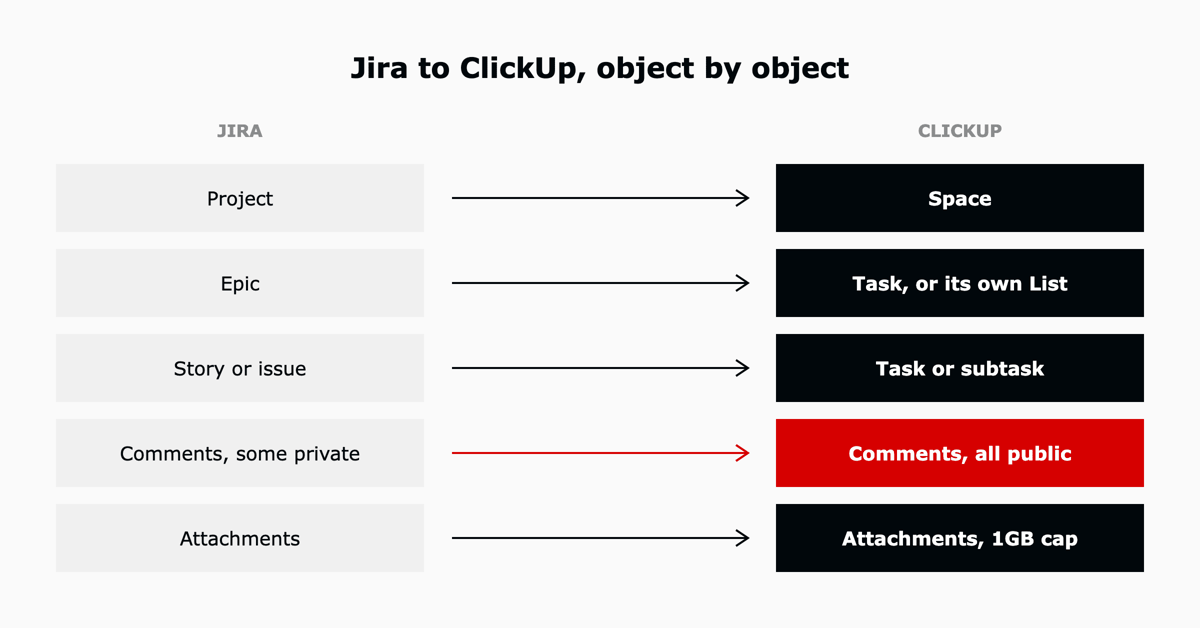
| Does not transfer | What it costs you | Handle it by |
|---|---|---|
| Recurring tasks | No record they existed once the import completes | Export a list of them from Jira before you start, then rebuild in ClickUp |
| The Priority field | Every task arrives without priority | Map priority into a built-in custom field before export, or bulk-set it after import using the Bulk Action Toolbar |
| Links between tasks | Cross-references in descriptions and comments become dead text | Accept it for closed work. For active work, add ClickUp relationships to the tasks that matter |
| Custom fields you defined yourself | Only Jira's built-in field types import. Bespoke fields are dropped | Recreate the fields in ClickUp first, then map the closest built-in Jira field to them |
| Timestamps | Activity history loses its clock | Nothing. Keep the Jira instance read-only for a quarter if audit history matters |
| Private comments | They arrive public, visible to anyone in the Space | Audit internal comments in Jira before export, or restrict the target Space until you have reviewed them |
| Time logged on issues | All logged time is reassigned to whoever runs the import | ClickUp's own recommendation: add a note on each issue in Jira recording who tracked the time |
| Label field behaviour | Built-in Label fields become ClickUp Tags, but Label custom fields become Label custom fields | Decide which you want, and normalise labels in Jira first |
The time-tracking reassignment is the one that catches engineering teams. Every hour ever logged in Jira appears under one person's name in ClickUp. If that history feeds a billing or capacity report, deal with it before the import, not after.
Step seven of the importer asks how epics and stories should be arranged, and the answer determines your status model. It is the single most consequential choice in the whole process, because unwinding it means redoing the status mapping by hand.
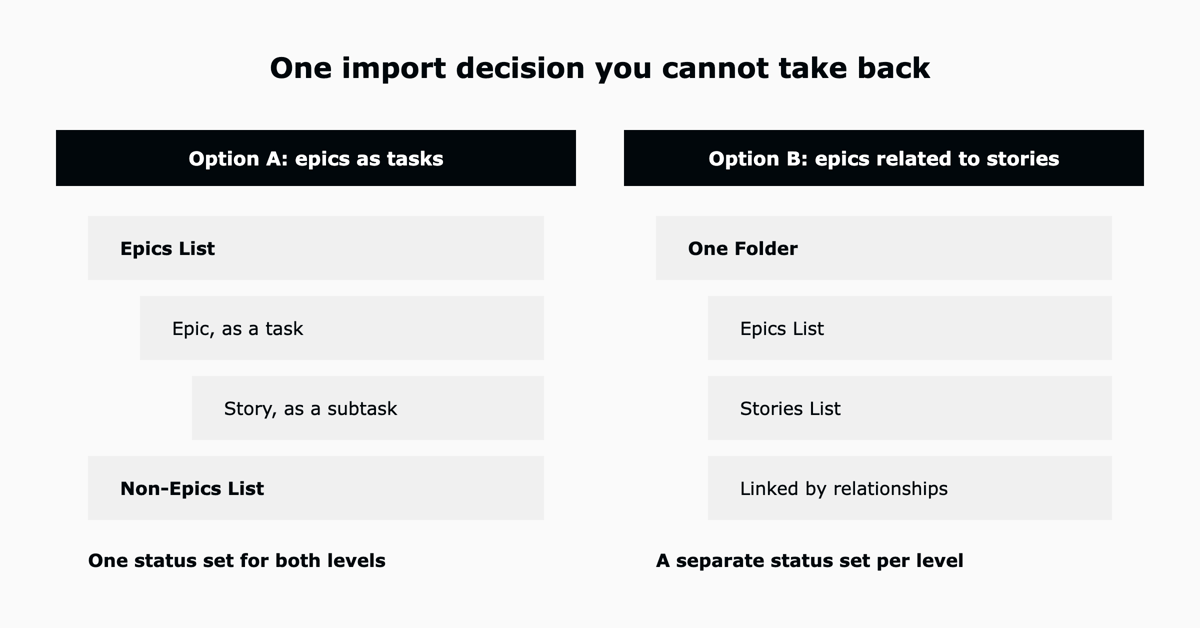
| Epics as tasks, stories as subtasks | Epics and stories as related tasks | |
|---|---|---|
| Structure | One Epics List. Every epic is a task, every story a subtask. Anything that is neither goes to a Non-Epics List | One Folder holding an Epics List and a Stories List, linked by ClickUp relationships |
| Statuses | Epics and stories share one status set | Each level gets its own status set |
| Choose it when | Your epics and stories move through the same workflow, and you want the parent-child view | Epics are roadmap items with their own lifecycle and stories are sprint work |
The importer also switches on the Nested Subtasks ClickApp automatically, so your subtask depth carries over.
ClickUp's own guidance for large Jira imports is to bring one or a few projects at a time. Three reasons it holds up in practice: a failed batch costs one project rather than the whole estate, mapping mistakes surface while they are still cheap to fix, and the team can start working in the first migrated project while the rest is still moving.
Before exporting, delete dead projects and strip large attachments from Jira, then re-add the attachments that matter after the import. That single step is usually the difference between a file that scans in twenty minutes and one that scans overnight. The wider sequence, which applies whatever tool you are leaving, is in our ClickUp migration guide.
The importer moves work items. It does not move the way you run agile. Expect to rebuild:
A growing technology company came to L5 running agile delivery in Jira and finding the platform heavier than the team needed. L5 designed the target workspace first, then configured sprint, epic and initiative management, backlog and story grooming, Kanban boards, time estimates and tracking, and burndown reporting, and guided the Jira migration into that structure rather than into a blank workspace. The engineering team ended up with visible task progress and deadlines across the group and a planning cadence it kept, which is the outcome the importer alone does not produce.
Download a backup of your Jira data, then in ClickUp open your Workspace avatar, Settings, Imports / Exports, and select Jira. Choose Jira Cloud or Jira Software, upload the backup, then work through the wizard: pick projects, choose a hierarchy option, select a target Space, map users, map custom fields, and map statuses. Import in batches of one or a few projects rather than everything at once.
No. The importer moves issues, subtasks, comments, attachments, dependencies and statuses. Sprint structure, story points, velocity and burndown reporting are rebuilt in ClickUp using the Sprints ClickApp and dashboard cards.
Recurring tasks, timestamps, the Priority field, links between tasks, and custom fields you defined yourself. Only Jira's built-in custom field types import. Private comments arrive as public comments, and time logged on issues is reassigned to whoever runs the import.
For small and mid-size product teams running light agile, usually yes: ClickUp has sprints, story points, burndown charts and Kanban boards. Large engineering organisations running formal Scrum with deep DevOps tooling will find Jira's release planning and developer integrations hard to replace. Our ClickUp vs Jira comparison works through that decision in detail.
Scanning and importing a large backup file can take several hours, and ClickUp notes the upload step alone can run that long for big instances. The migration as a project takes weeks, because the hierarchy design, the agile rebuild and the batch verification are the real work. Plan the design before you touch the importer.
No. Atlassian continues to develop Jira, and it remains the default for large-scale software engineering. Teams leave it for fit reasons rather than availability ones: mixed teams that need docs, time tracking and multiple views in one place often find Jira heavier than their work requires.
Every problem above is solvable, and almost none of them are solvable after the fact. L5 has onboarded more than 600 customers onto ClickUp in two years, and our ACT methodology compressed that onboarding from 55 days to 7 by settling the hierarchy, the status model and the agile configuration first, then running the import into a workspace that was already designed.
As a ClickUp Diamond and Preferred Partner, L5 designs and runs these migrations for engineering teams. Talk to us about scoping yours.


The full article with its figures, tables and sources, set for reading offline, printing, and sharing.
On its way to your inbox You can also download it right now.
Download the PDF Last updatedKeep reading
Migrating to ClickUp has two halves. ClickUp's native importers move your tasks, comments and attachments across from As...
Read
There are hundreds of ClickUp implementation partners. Most of them can configure a workspace, build some automations, a...
Read
Last verified July 2026. Connecting ClickUp to Make.com takes about five minutes and no code. You create a scenario in M...
ReadField notes on AI operations and service management, direct to your inbox. New insights, the week we publish them.
No spam. Unsubscribe any time.