ClickUp for Marketing Agencies: Is It the Right Fit?
ClickUp works well for a marketing agency when clients need to work inside the tool, when time is billed against a retai...
ReadHow marketing agencies run ClickUp: 12 workflows across the client lifecycle, the workspace structure behind them, and the guest setup that keeps each client in their own folder.
 L5 Team
Marketing agencies run ClickUp for four jobs: winning work, planning it, producing it, and proving it was worth the retainer. The structure that makes all four possible is one Space for client delivery, one Folder per client, and the same four Lists inside every client Folder. Below are 12 workflows mapped to the stages of a client engagement, the guest-access setup that lets clients into their own work and nothing else, and the plan tier each of these actually needs. If you are still deciding whether the platform suits your agency at all, start with whether ClickUp fits a marketing agency.
Every agency workspace problem traces back to structure. Agencies that build a bespoke setup per client end up unable to answer "how loaded is the studio next week" because no two clients are shaped the same. One identical template per client fixes reporting and onboarding at the same time.
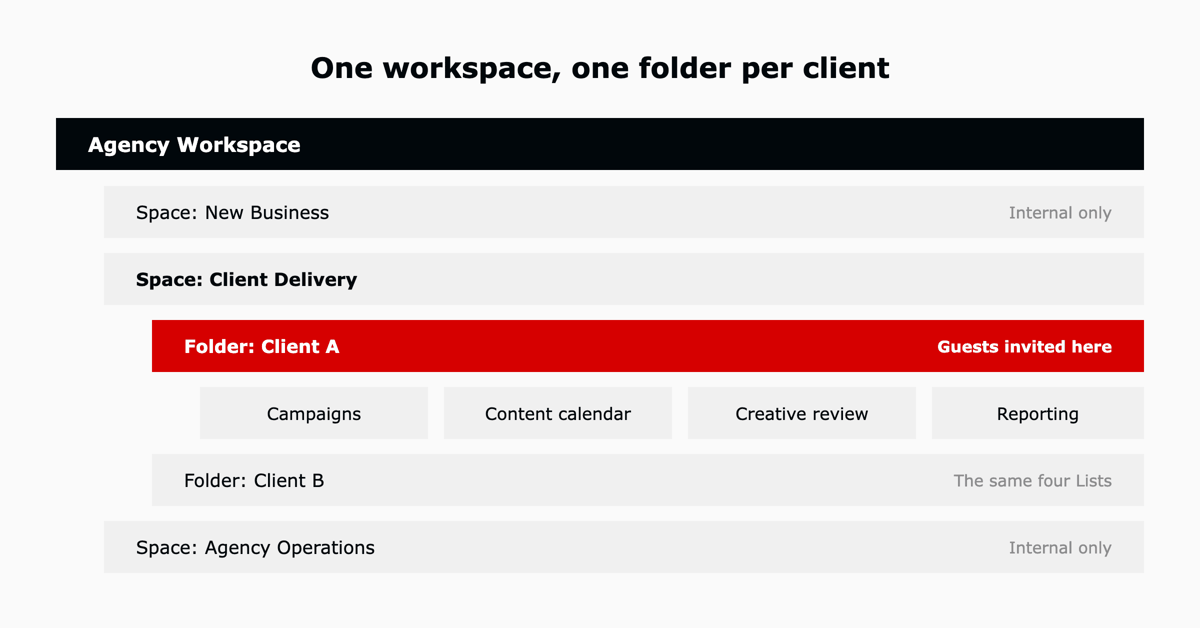
Three Spaces, not one per client. New Business holds the pipeline. Client Delivery holds a Folder per client. Agency Operations holds the things clients never see: hiring, finance, internal marketing, contractor onboarding. Every client Folder gets the same four Lists, so a new account is a template application rather than a build. That was the shape behind one agency replacing Excel with ClickUp to scale, and agencies arriving from another tool should read the ClickUp migration guide before building it.
| Stage | Workflow | What powers it in ClickUp |
|---|---|---|
| Win | Pipeline and proposals | Custom statuses mirroring sales stages, custom fields for deal value |
| Win | Client and campaign intake | Forms with conditional logic, task templates |
| Win | Scoping and estimates | Time estimates, task templates per deliverable type |
| Plan | Client onboarding | Folder template, checklists, guest invitations |
| Plan | Campaign planning | Gantt view, milestones, dependencies |
| Plan | Content calendar | Calendar view, recurring tasks, custom fields for channel |
| Produce | Creative production | Kanban board, custom statuses per craft |
| Produce | Creative review and approval | Proofing on attachments, comment threads, approval statuses |
| Produce | Capacity and workload | Workload view, time estimates, Team view |
| Prove | Time tracking against retainer | Native time tracking, billable flags, time reporting |
| Prove | Client reporting | Dashboards with cards scoped to the client Folder |
| Prove | Renewal and scope review | Time-vs-estimate reporting, review-round counts |
Pipeline and proposals. Custom statuses mirror your sales stages, and custom fields carry deal value, source and expected start. In practice: a proposal that goes quiet sits in one board with a next-action date rather than in three people's inboxes.
Client and campaign intake. A ClickUp form with conditional logic collects the brief and creates a structured task on submission. In practice: a client requesting a landing page fills in the fields your designers always have to chase, and the task arrives with the audience, offer and deadline already on it. One agency rebuilt its whole intake process around exactly this.
Scoping and estimates. Time estimates on template tasks turn a deliverable list into an hours number. In practice: a five-deliverable campaign is priced from the same estimates the studio will later be measured against, so the retainer and the capacity plan use one set of figures.
Client onboarding. Applying the client Folder template creates the four Lists, the kickoff checklist and the guest invitations in one action. In practice: a new account is live in ClickUp the day the contract is signed instead of the week someone gets around to setting it up.
Campaign planning. Gantt view with dependencies shows what a slipped asset does to a launch date. In practice: a delayed photo shoot automatically flags the paid-media tasks that depend on it, before the media buy is booked.
Content calendar. Calendar view over a content List, with channel and format as custom fields. In practice: a client asking "what is going out next month" gets a calendar link rather than a deck someone builds on Friday.
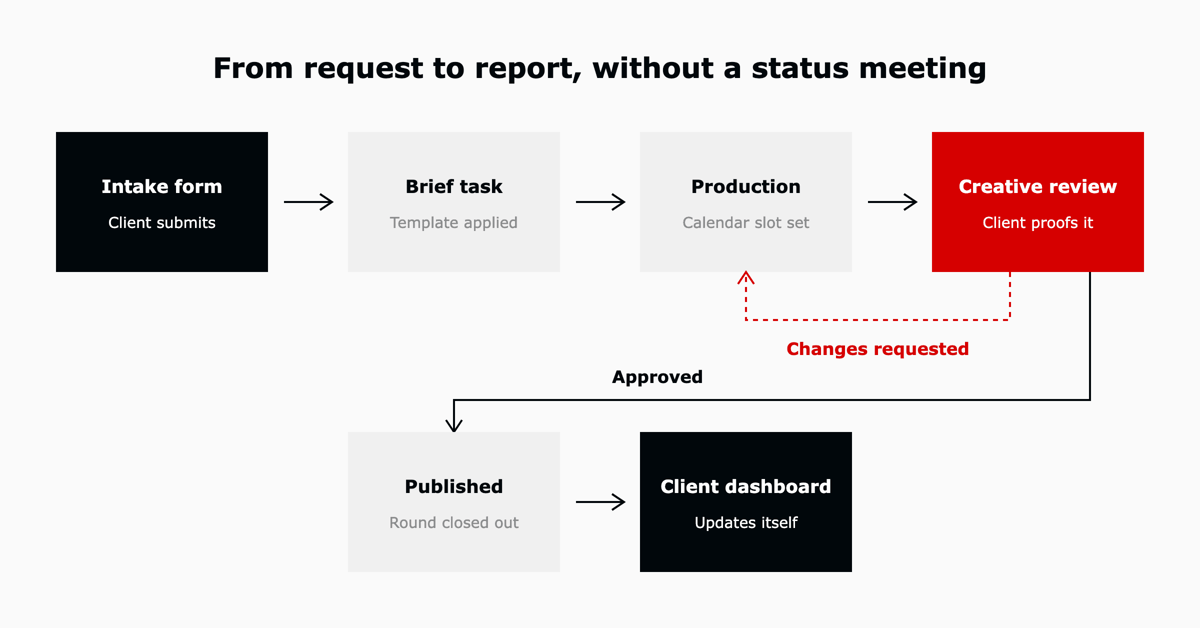
Creative production. A Kanban board with statuses that match how the studio actually works, rather than a generic to-do and done. In practice: a copywriter sees only the tasks in Copy Draft, and the board itself tells the traffic manager where work is piling up. A digital content agency runs its production this way.
Creative review and approval. Clients comment directly on attachments, and an approval status closes the round. In practice: round three of a video edit is visible as round three, which is the evidence you need when a client says the scope has not changed.
Capacity and workload. Workload view with time estimates shows who is over-committed before the week starts. In practice: a new rush request gets assigned to the designer with room rather than to whoever answers first.
Time tracking against retainer. Native time tracking with billable flags, reported by client. In practice: a monthly retainer review opens a dashboard instead of reconciling a timesheet export against an invoice.
Client reporting. A dashboard scoped to one client Folder, shared with that client's guests. In practice: the status call becomes a conversation about decisions because the client already read the status.
Renewal and scope review. Hours delivered against hours scoped, plus review-round counts per deliverable. In practice: a renewal conversation starts with the two clients who consumed 140% of their retainer, and the agency has the record to show it.
This is the question that decides whether an agency can use ClickUp as a client-facing tool at all. ClickUp guests are invited at a specific level of the hierarchy, so inviting a client at their own Folder gives them everything inside it and nothing outside it. That is why client work belongs in Folders under one Client Delivery Space rather than in a Space per client: guests scoped to a Folder cannot see sibling Folders, and your margins, pipeline and hiring stay in Spaces they were never invited to.
Guest permissions require a paid plan. Free Forever does not support them, so client-facing use starts at Unlimited.
| Plan | What the tier adds for an agency | Verdict |
|---|---|---|
| Free Forever | Core task management, one form, 60MB total storage, 100 automations a month | Evaluation only. No guest access and no room for creative files. |
| Unlimited | Guest permissions, unlimited storage, Gantt, native time tracking, 1,000 automations a month | The floor for client-facing work. Enough for a small agency with a handful of accounts. |
| Business | Unlimited dashboards, Workload and Timeline views, advanced time tracking, 5,000 automations a month | Where most agencies land. Workload and dashboards are the two things a studio cannot run without. |
| Enterprise | SSO, audit logs, higher automation ceiling | Relevant when a client contract requires it. |
Full figures and per-seat costs are in our ClickUp pricing guide. The table above is about which tier unlocks which workflow. If the buying decision itself is still open, whether ClickUp fits your agency weighs it against the alternatives.
The workload view is the line between an agency that says yes to work it cannot deliver and one that does not. It is a Business plan feature, which makes Business the practical tier for any agency with a studio.
For most agencies under 250 people, a ClickUp pipeline with custom statuses and custom fields covers new business without a separate CRM. It tracks opportunities, next actions and deal value, and it sits next to the delivery work, so a won deal becomes a client Folder in the same tool. Agencies with a dedicated sales team, sequenced outbound, or marketing attribution requirements will still want a real CRM connected to ClickUp rather than replaced by it. Our complete ClickUp review covers where the platform is strong and where it is not.
By inviting them as guests at their own client Folder. A guest sees everything inside the Folder they were invited to and nothing above or beside it, so one Client Delivery Space with a Folder per client keeps every account separate. Guest permissions require a paid plan, starting at Unlimited.
Yes for new business tracking. Custom statuses mirror your sales stages and custom fields carry deal value, source and owner, all in the same workspace as delivery. Agencies running sequenced outbound or needing marketing attribution should keep a dedicated CRM and integrate it.
One Space for client delivery, one Folder per client, and the same Lists inside every client Folder. Identical structure is what makes cross-client reporting and workload views possible, and it turns onboarding a new account into applying a template.
Yes. Clients and reviewers comment directly on attached files, and an approval status closes each round on the task. Because rounds are recorded on the task, review-round counts become evidence in a scope conversation at renewal.
L5 runs its own marketing on ClickUp and has onboarded more than 600 customers onto the platform in two years, agencies among them. The 12 workflows above exist as accelerators rather than as advice: the client Folder template, the intake forms, the creative review statuses and the client dashboard are built and handed over, then operated week after week rather than left for someone to maintain.
As a ClickUp Diamond and Preferred Partner, L5 builds these workflows as ready-to-use accelerators and operates them week after week. Contact us to see the agency accelerators.


The full article with its figures, tables and sources, set for reading offline, printing, and sharing.
On its way to your inbox You can also download it right now.
Download the PDF Last updatedKeep reading
ClickUp works well for a marketing agency when clients need to work inside the tool, when time is billed against a retai...
Read
ClickUp is a work management platform that professional services firms use to run client delivery, resourcing, billable ...
Read
Opportunity A marketing company provides web development services to its customers, from initial website development to ...
ReadField notes on AI operations and service management, direct to your inbox. New insights, the week we publish them.
No spam. Unsubscribe any time.