12 ClickUp Workflows for Marketing Agencies
Marketing agencies run ClickUp for four jobs: winning work, planning it, producing it, and proving it was worth the reta...
ReadWhether ClickUp suits a marketing agency: the four problems it solves for client work, where it falls short, and what agencies compare it against.
 L5 Team
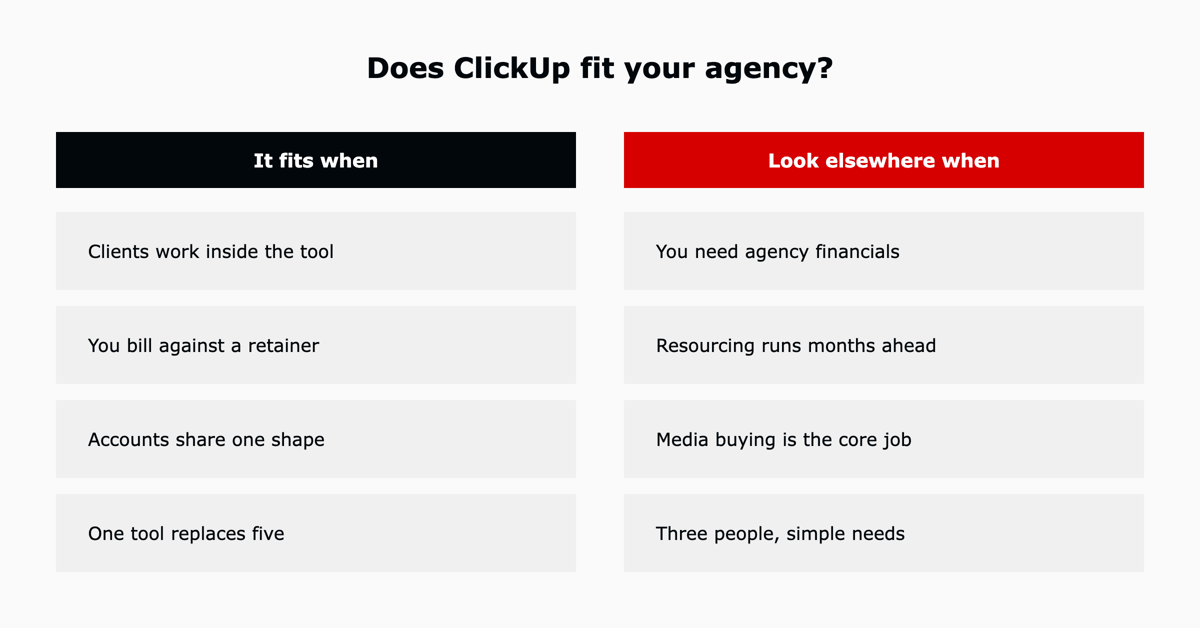
ClickUp works well for a marketing agency when clients need to work inside the tool, when time is billed against a retainer, and when several accounts can run on the same structure. It is a weaker choice when your central problem is agency financial forecasting, long-range resource planning, or media buying and attribution. This page is a fit assessment for agency work rather than a general ClickUp review. For the platform's full feature set, pricing tiers and honest pros and cons, see our complete ClickUp review.
ClickUp for agencies works for most firms under 250 people, and the reason is specific rather than general. An agency needs four things that a plain task tracker does not provide: client-facing access that does not expose the rest of the business, creative review with a record of every round, capacity visibility across accounts, and time captured against a retainer. ClickUp covers all four in one workspace. Guest permissions arrive on the Unlimited tier, and Workload plus dashboards arrive on Business.
This is the one that decides whether an agency can use ClickUp as a client-facing tool at all. Guests are invited at a specific level of the hierarchy and see only what sits inside it, so a client invited at their own Folder sees their work and nothing beside it. Put client work in Folders under one delivery Space, keep new business and agency operations in separate Spaces, and margins and pipeline stay invisible to the people paying the invoices.
Clients comment directly on attached files and an approval status closes each round. Because rounds are recorded on the task rather than in an email thread, round four is visibly round four. That record is what turns a scope conversation at renewal from an argument into a reading.
Workload view with time estimates shows which people are over-committed before the week starts, across every client rather than one at a time. This is the workflow that stops an agency accepting work it cannot deliver, and it is the practical reason most agencies land on the Business tier rather than Unlimited.
Native time tracking with billable flags, reported by client. A monthly retainer review opens a dashboard rather than reconciling a timesheet export against an invoice. Hours delivered against hours scoped is also the number that makes a renewal conversation concrete.
Being specific about the gaps is more useful than a feature list, and these are the four that come up repeatedly in agency evaluations.
| Gap | What it means in practice |
|---|---|
| Agency financials | ClickUp tracks time and estimates. It does not do revenue forecasting, profitability by client, or pipeline-weighted capacity planning. Agencies that manage to a monthly P&L keep a finance tool alongside it. |
| Long-range resourcing | Workload is strong for the current and next few weeks. Booking named people against projects three or six months out is the job of a dedicated resource management platform. |
| Media buying and attribution | Nothing here connects to ad platforms or reports on spend and performance. Paid media reporting stays in your ad tooling or a BI layer. |
| Setup cost | The flexibility that makes ClickUp fit an agency is also what makes a bad configuration expensive. A workspace built differently for each client cannot answer basic cross-client questions, and restructuring later means moving live work. |
The most common agency failure with ClickUp is structural rather than functional. Agencies that build a bespoke setup per client lose the cross-client reporting that made the tool worth buying.
ClickUp Brain is a paid add-on rather than part of the plan tiers, and for an agency its value is concentrated in two places. The first is knowledge search across the workspace, which answers "where did we land on this client's tone of voice" without interrupting the person who knows. The second is summarising activity on an account, which turns a status update into something a client lead reads rather than assembles. Treat first-pass copy generation as a starting point that still needs an editor, and budget the add-on separately from seats. Our guide to ClickUp Brain covers what it does, what it costs and how it handles your data.
Three alternatives come up in almost every agency evaluation, and each wins on a different axis.
| Option | Where it wins | Where it loses |
|---|---|---|
| Dedicated agency platforms | Financials first: utilisation, profitability per account, revenue forecasting, and pipeline-weighted capacity. Built for how an agency is run as a business. | The delivery layer is usually shallower, and client-facing collaboration is often an add-on rather than the core. |
| General work management tools | Familiar, quick to start, and strong at the task layer. Fine when the agency is small and every account is handled the same way. | Client access, review cycles and retainer time tracking tend to need separate tools bolted on, which is how a five-tool stack starts. |
| Spreadsheets | Free, instant, and infinitely flexible for one person who understands the file. | No client access, no review trail, no capacity view, and the structure lives in one person's head. This is the setup most agencies are leaving. |
ClickUp sits between the first two. It goes deeper than a general task tool on the four agency problems above, and it does not attempt the financial reporting a dedicated agency platform is built around. Agencies that run both, ClickUp for delivery and a finance tool for the P&L, are making a deliberate choice rather than a compromise.
Guest permissions require a paid plan, so client-facing use starts at Unlimited. Workload and unlimited dashboards, the two things a studio cannot run without, arrive on Business, which is where most agencies land. Free Forever caps the whole workspace at 60MB, which creative files exhaust immediately, so treat it as an evaluation tier only. Per-seat figures and the annual versus monthly difference are in our ClickUp pricing guide.
The fit question and the setup question are different problems. If ClickUp is the right call, the structure to build is one delivery Space, one Folder per client, and the same Lists inside every client Folder, which is what makes cross-client reporting and workload views possible in the first place. Our 12 ClickUp workflows for marketing agencies covers that build in full, mapped across the client lifecycle.
Yes for most agencies under 250 people, on the Business plan. Agencies need client-facing access that does not expose the rest of the business, creative review with an audit trail, capacity planning across accounts, and time tracked against a retainer. ClickUp covers all four in one workspace, with guest permissions from Unlimited and Workload plus dashboards from Business. It is a weaker fit when the central need is agency financial forecasting, long-range resource booking, or media buying and attribution reporting.
Business for most. Unlimited is the floor for client-facing work because that is where guest permissions and native time tracking start, but Workload and unlimited dashboards are Business features and those are the two an agency with a studio relies on. Free Forever is evaluation only, capped at 60MB of storage.
They solve different problems. Dedicated agency platforms lead with financials, utilisation and forecasting, and bolt project management on. ClickUp leads with the work and does not attempt the financials. If your pain is delivery, review cycles and client visibility, ClickUp is the stronger fit. If your pain is profitability per account, it is not.
L5 runs its own marketing on ClickUp and has onboarded more than 600 customers onto the platform in two years, agencies among them. Our ACT methodology compressed ClickUp onboarding from 55 days to 7 by settling the structure, the client-access model and the reporting before configuration starts, then operating the workspace week after week rather than handing over a build.
As a ClickUp Diamond and Preferred Partner, L5 builds these agency workflows as ready-to-use accelerators. Contact us to see the agency accelerators.


The full article with its figures, tables and sources, set for reading offline, printing, and sharing.
On its way to your inbox You can also download it right now.
Download the PDF Last updatedKeep reading
Marketing agencies run ClickUp for four jobs: winning work, planning it, producing it, and proving it was worth the reta...
Read
Opportunity A marketing company provides web development services to its customers, from initial website development to ...
Read
Opportunity A marketing agency that frequently worked with a state organization had a significant challenge with project...
ReadField notes on AI operations and service management, direct to your inbox. New insights, the week we publish them.
No spam. Unsubscribe any time.