ClickUp for Marketing Agencies: Is It the Right Fit?
ClickUp works well for a marketing agency when clients need to work inside the tool, when time is billed against a retai...
ReadAn honest, up-to-date ClickUp review: core features, where it stands out, where it takes planning, and who it actually fits.
 L5 Team
ClickUp is an all-in-one project and work management platform that combines task tracking, docs, chat, whiteboards, time tracking, and reporting in a single workspace. Teams use it to replace a stack of separate tools, a task tracker, a docs app, a chat tool, a time tracker, with one connected system. Below is a full review of what ClickUp does, its core features, where it's a strong fit, what to plan for, and how to decide if it works for your team.
ClickUp's free plan is genuinely usable rather than a limited trial. Paid plans add unlimited Gantt charts, whiteboards, and dashboards. Views, statuses, and fields can all be tailored per team, which is what makes the platform feel built around how a specific team works rather than a generic template.
The tradeoff for that depth of customization: teams get the most value when they start with a simple setup and add views and automations as they go, rather than turning everything on at once. There's also no dedicated team message board, though chat and task comments cover most of the same ground.
ClickUp is a collaboration platform that combines dashboards, project tracking, workflow tools, and document management into one productivity system. It is one of the more feature-rich project management platforms available, built to serve individuals, small teams, and larger multi-team organizations from a single free-to-start plan.
The free plan includes collaborative docs, whiteboards, Kanban boards, unlimited tasks, and sprint management, which already makes it a workable project management tool for small teams. The three paid plans, Unlimited, Business, and Enterprise, add the storage, views, and controls that larger or more regulated teams need.
Users can switch between views to match how they work: a list view for straightforward task tracking, a board view for kanban-style workflows, and a Gantt view for scheduling dependencies. Workspaces can also be customized by color, theme, and description, which helps distinguish teams and projects at a glance.
ClickUp's core functions fall into three groups: task management, time management, and collaboration. For task management, teams build workflows in whichever of the 12 available views fits them, list, board, Gantt, calendar, or others, and every view can be customized further with statuses, fields, and templates.
Time management features include scheduling, calendar management, capacity planning, and native time tracking. Collaboration tools include comments on any task or document, real-time chat, file and video sharing, and in-app screen recording so teams can explain a task without a meeting or an email thread.
ClickUp also ships with ClickUp Brain, its built-in AI layer for drafting updates, summarizing threads, and searching across a workspace. Brain is sold as an add-on on top of a paid plan, and ClickUp has continued to expand what it covers, including the ability to switch between AI models rather than being locked to one. For a closer look at what it does day to day, see our review of ClickUp Brain's key features.
Most project management tools do one or two things well. ClickUp's advantage is how much it connects in a single place, which shows up in a few specific ways.
ClickUp has four plans, billed annually: Free Forever at $0, Unlimited at $7 per user per month, Business at $12, and Enterprise at custom pricing. The Free plan covers real work for a small team. Business is where most growing teams land, because it lifts the automation and dashboard limits. Enterprise is the starting point for teams with HIPAA or strict compliance requirements.
Verified July 2026. ClickUp changes plans and prices without notice, so confirm current figures before you budget.
The full plan-by-plan breakdown, the real monthly total for teams of 10, 25, and 50, and the add-ons that change that number are in the ClickUp pricing guide. As an official ClickUp Diamond Partner, L5 helps mid-market teams settle plan choice and configuration together, so they do not become two separate problems.
ClickUp's depth is also what makes it take a bit of setup time to feel effortless. Teams that start with a simple view structure, and add automations and custom fields once the basics are working, tend to be productive within their first couple of weeks. Templates (ClickUp's own, or ones a partner builds for you) shorten that ramp-up significantly.
ClickUp's flexibility is its main strength and the source of its few rough edges. None of the following are dealbreakers. They are the areas that reward a deliberate setup rather than turning everything on at once.
These are the issues experienced teams plan around, and the reason a structured rollout pays off. We cover them in our guide to common ClickUp implementation challenges.
ClickUp follows PCI standards for handling payment data, encrypts data in transit and at rest, and monitors platform performance and security continuously. Two-factor authentication is available on every plan, including Free, and is required with optional Google Single Sign-On on the Business plan.
HIPAA and MSA availability are reserved for the Enterprise plan; ClickUp doesn't extend HIPAA coverage to lower tiers.
Worth noting for healthcare teams: signing an MSA doesn't automatically cover every feature. AI tools in particular usually need to be explicitly listed as HIPAA-eligible in the agreement, or disabled for anyone handling protected health information. Confirm the detail with ClickUp before you scope a healthcare rollout.
Every plan, including Free, includes 24/7 access to ClickUp's Help Center, an API for teams that want to build custom integrations, ClickUp University, templates, and webinars. Paid plans add live chat support, and the Business plan adds priority support for faster resolution. Live chat starts with an automated assistant that resolves common questions immediately, then hands off to a person for anything more specific.
ClickUp has shipped new features at a fast pace, most of them centered on AI. The highlights through mid-2026:
Most of these AI capabilities are delivered through ClickUp's paid add-ons rather than the base plans. Because the feature set moves quickly, confirm current availability and pricing with ClickUp before you plan around a specific tool.
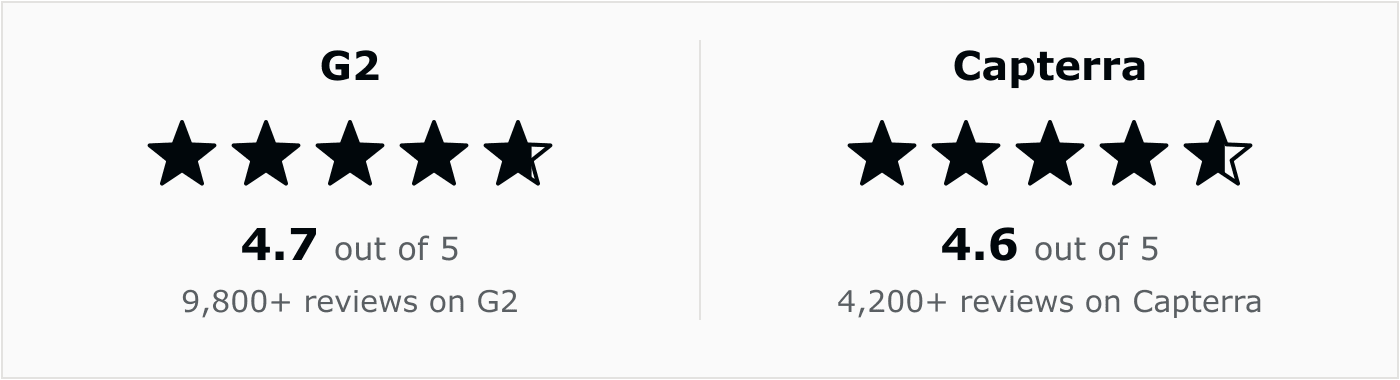
Beyond our own review, ClickUp is one of the more heavily reviewed platforms in the category. The pattern across both is consistent with what we've found here: reviewers consistently cite the all-in-one flexibility and the pace of new feature releases as reasons they stick with it long-term.
The difference between a ClickUp workspace a team relies on and one it quietly abandons is almost always the setup, not the software. A few decisions made early save months of cleanup later. These are the ones that matter most.
This is the work an implementation partner takes off your plate. For the details, see our six-step migration guide and what a ClickUp Diamond Partner actually does.
Key Takeaway
ClickUp rewards a deliberate setup. Decide the hierarchy, statuses, and permissions before you scale, keep automations few and documented, and give one person ownership of the workspace.
ClickUp is a strong fit for teams that want one platform instead of several, and are willing to spend a little setup time to get the views and automations configured well. Its free plan is competitive, its paid plans scale with team size and compliance needs, and features like ClickUp Brain add real AI utility rather than a bolted-on chatbot.
Teams that want a single-purpose tool with zero setup may prefer something narrower. But most teams get more long-term value from ClickUp's flexibility, especially with the initial setup handled by a partner.
Yes, for most teams that want one platform instead of several. It holds strong review scores (4.7/5 on G2, 4.6/5 on Capterra) years after launch, keeps shipping new features rather than stagnating, and its free plan remains genuinely usable rather than a stripped-down trial. The main condition is setup time: teams get the most value when a person or partner configures views and automations around how the team actually works.
ClickUp's core features are customizable views (List, Board, Gantt, Calendar, and more), native time tracking, docs and wikis, automations, goal tracking, and ClickUp Brain, its built-in AI assistant. Paid plans add advanced reporting, unlimited dashboards, and admin controls.
It's genuinely usable, not a time-limited trial. ClickUp's Free plan includes unlimited tasks, collaborative docs, whiteboards, and core views with no expiration date. The tradeoff is capacity, not features: 60MB of storage and 100 automations a month, enough to run a small team's real work rather than just a product demo.
The main strengths are its usable free plan, deep customization, real-time collaboration, and built-in AI through ClickUp Brain. The main thing to plan for is setup time: because so much is configurable, teams get the most out of ClickUp when they start simple and build up their views and automations as they go.
Teams that want a single-purpose tool with zero configuration, and no interest in the extra views, automations, or AI features, may be better served by something narrower. ClickUp's flexibility is a strength for teams willing to spend a little setup time, but it's not built to be the simplest possible option out of the box.
L5 is an official ClickUp Diamond and Preferred Partner, specializing in configuring ClickUp to match how a specific team actually works rather than a generic template. That includes plan selection, workspace setup, automations, and the ongoing operation that keeps a ClickUp instance useful as a team grows, not just the initial rollout.
ClickUp is a capable, highly customizable platform for managing projects and work. Working with a partner for setup and ongoing operation means a team gets the parts of ClickUp built for its specific workflows, instead of assembling that configuration through trial and error.

The full article with its figures, tables and sources, set for reading offline, printing, and sharing.
On its way to your inbox You can also download it right now.
Download the PDF Last updatedKeep reading
ClickUp works well for a marketing agency when clients need to work inside the tool, when time is billed against a retai...
Read
Most ClickUp implementations do not fail on the software, they stall on the rollout: too many features switched on at on...
Read
ClickUp's Jira importer moves projects, issues, subtasks, comments, attachments, dependencies and statuses across, and i...
ReadField notes on AI operations and service management, direct to your inbox. New insights, the week we publish them.
No spam. Unsubscribe any time.