The Total Cost of Owning an ITSM Platform
Part of a series. This article is drawn from the L5 white paper on what a fragmented service portfolio really costs to r...
ReadAcquisitions, audits and fixed go-live dates force ITSM migrations. Four client cases show how to redesign the service and leave old workarounds behind.
 Amey Negandhi
Part of a series. This article is drawn from the L5 whitepaper on modernizing IT service management, and looks at the moment a platform change is forced. Download Modernizing IT Service Management.
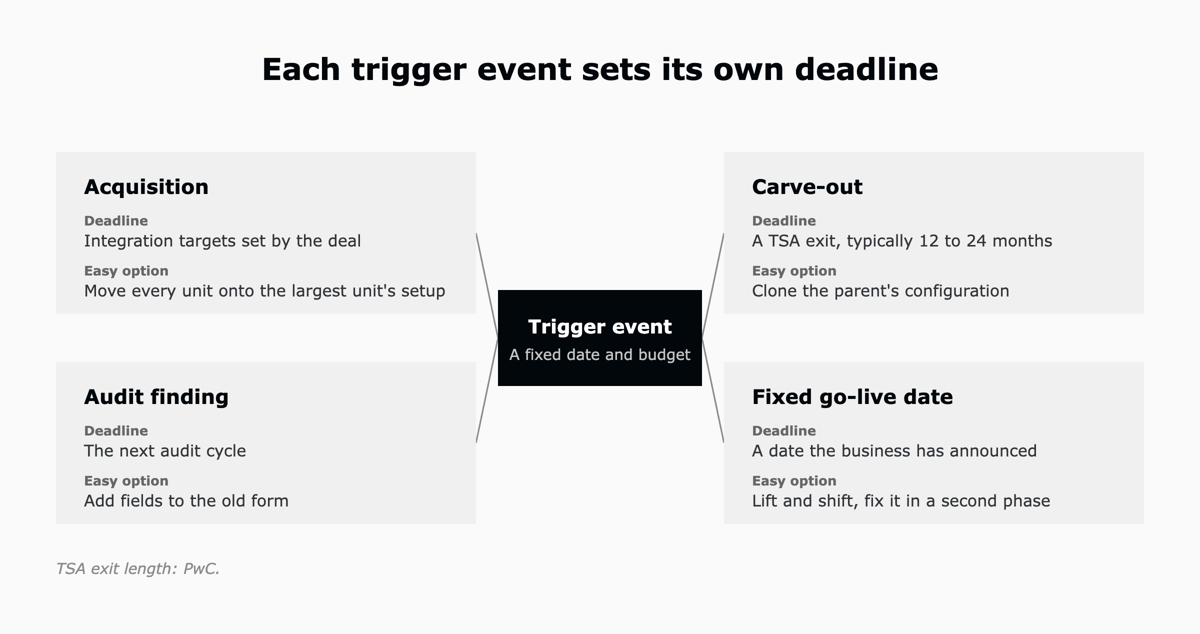
An ITSM migration usually happens because something forces the decision: a company is bought or carved out, a license ends, an audit raises a finding, or the business sets a go-live date. The months after that event are a rare chance to redesign the service, looking hard at each field, form, rule and report you inherited and deciding whether to keep, simplify, replace or retire it. A common mistake, which this article calls the replication trap, is to rebuild the old configuration on the new platform along with its workarounds.
In the conversations behind this article, the move was forced in exactly this way: a carve-out with a transition services agreement running out, a run of acquisitions, an outdated change tool that no longer met audit needs, and a legacy license ending on a fixed date. Four of those stories follow, after a look at why the timing matters and why copying is so tempting.
An ITSM platform is easiest to redesign around its launch. When Tyre and Orlikowski studied how organizations adapt new technology, they found that people did most of their adapting in a short window soon after the technology went into use. After that, people settled into routines, and little changed until a surprise or a new discovery set it off again.
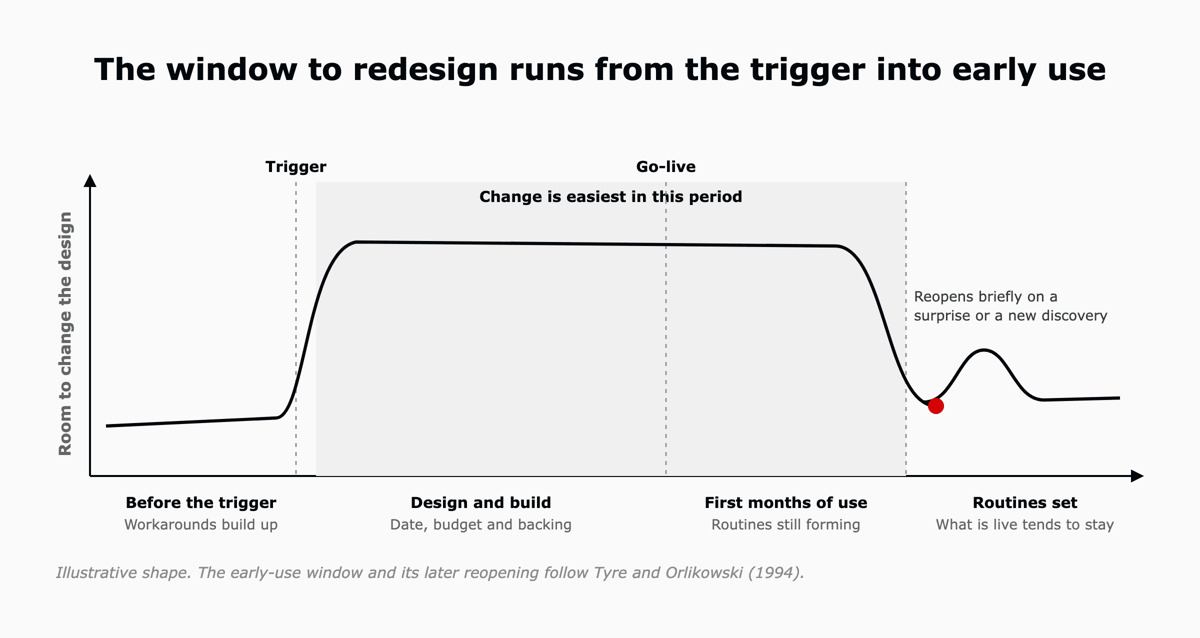
A trigger event opens that window early. It brings a date, a budget and senior backing, so the design work can start before go-live, and whatever is live when the routines settle is usually what stays. The time available is shorter than it looks.
PwC puts the typical exit from a transition services agreement (TSA), the period in which a carved-out business keeps using its former parent's systems, at 12 to 24 months, and counts more than 1,500 design decisions in a typical exit. Faced with that many decisions and a fixed end date, copying the existing setup can feel like the only safe plan.
Teams copy the old configuration because it is the easiest plan to write down and test, and few people will argue with it when the date is close. Saritasa's 2025 survey of US IT professionals found the same instinct: among the 299 respondents whose organizations still run legacy systems, the most-cited reason for not modernizing, given by half of them, was that the current system still works.
Decision research helps explain the instinct. Samuelson and Zeckhauser showed that people lean toward keeping things as they are, and Norton, Mochon and Ariely found that people place a higher value on things they have built themselves. If you have looked after a configuration for years, both apply to you.
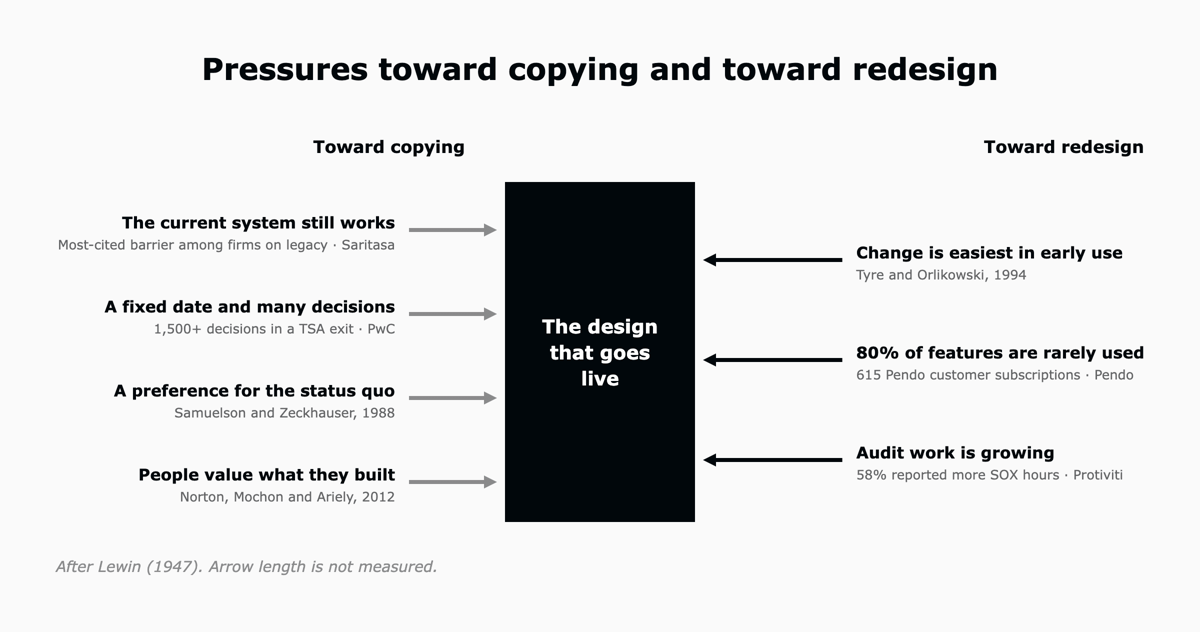
The trouble is that the old configuration makes a poor specification. Thoughtworks put legacy migration feature parity on Hold in its Technology Radar in 2019 and 2020 and called it an antipattern, pointing out that older systems often carry many features their users no longer touch. Pendo's data points the same way: across 615 of its customers' software subscriptions, 80 percent of features in the average product were rarely or never used.
Rebuilding those features also adds work to projects that tend to overrun already. Ensono reports that 71 percent of modernization initiatives have exceeded planned costs. Here is how the two approaches differ for five common elements.
| Element | Copied | Redesigned |
|---|---|---|
| Fields and forms | Rebuilt as they were | Kept where usage data shows people use them |
| Approvals | Copied step for step | Matched to the risk of the request |
| Change types | As the old tool defined them | Standard, normal and emergency, as in ITIL |
| Undocumented rules | Rebuilt without anyone writing them down | Written down first, then kept or retired |
| Acceptance test | The new platform does what the old one did | The platform meets its agreed service levels and audit controls |
Each of the organizations below had a deadline and an easy option to copy what it already ran. Two are L5 clients, and two were prospects we were scoping.
This chemicals company was partway through three acquisitions, and the businesses it was bringing together ran on different service tools, one of them an enterprise ITSM platform. In its own words, "it's all fragmented." The obvious move is to pick the biggest unit's tool and move the others onto its configuration, workarounds included.
Our recommendation in a case like this is to agree how the combined company should run service before choosing any tool, with one set of request types, priorities and change types for the whole group. Once that model exists, the platform configuration follows from it, and picking the tool becomes a smaller decision that can come later.
When this healthcare business was carved out of a larger group, it kept running on the parent's ITSM platform under a TSA with a fixed end date, and HR and the other employee services had no central place to manage cases. Cloning the parent's setup would have been the quickest way to meet the exit date. We proposed designing for the company it is becoming, with fewer groups, simpler routing and one way of managing cases across employee services.
This financial services client ran change management on an outdated tool, and who got assigned a change was, in the team's words, "fully tribal knowledge."
Audit needs shaped the new design, and the team was clear about what it did not want from the new form: "What we don't want to do … is create it so that it takes you 45 minutes to generate the change request in order to … build a USB flash drive."
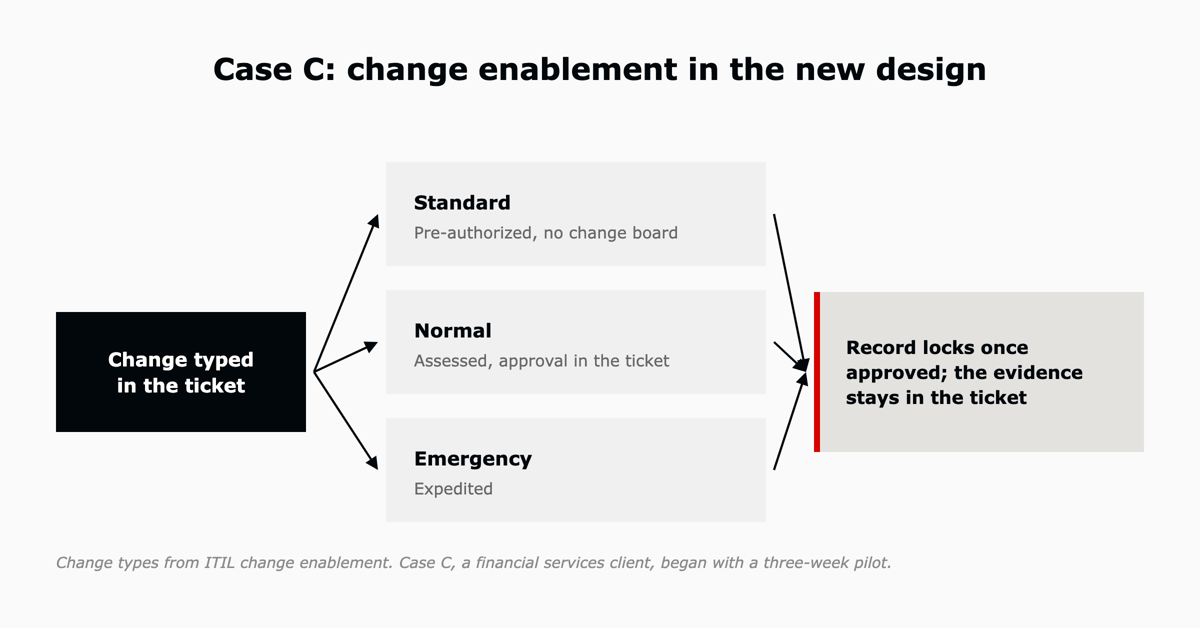
We simplified the process around the three change types in ITIL change enablement. Standard changes are low risk and pre-authorized, normal changes are assessed and authorized, and emergency changes are expedited. ITIL Version 5, released in 2026, keeps all 34 ITIL practices, change enablement among them.
In the new design, routine work needs no change board, approvals are recorded in the ticket, and a record locks once it is approved. The client began with a three-week pilot before retiring anything.
This media client was moving off an email-based legacy system, and the deadline was fixed: the old vendor's licenses had to come out by April. Its IT lead summed up the tension inside the team: "They want a new coat of paint. They don't want someone to come in and take walls down. I think that fundamentally we need to take some walls down."
Our approach in a case like this is to keep the date and cut the scope, with fewer steps and a short list of request types, and to plan improvement work to carry on after launch so it does not depend on someone funding a second phase.
The pressure to copy looked much the same across the cases. The table shows where each pattern came up and what we put in its place.
| Pattern | Cases | What replaced it | Evidence |
|---|---|---|---|
| The old tool used as the specification | C, D | Acceptance against agreed service levels and audit controls | Feature parity is on Hold in the Thoughtworks Technology Radar |
| The deadline used as the design authority | B, D | A reduced scope at the same date, live in phases | A typical TSA exit involves more than 1,500 design decisions |
| One unit's setup used as the default | A, B | One service model for the organization as it is now | Adaptation clusters soon after a system goes into use |
| Undocumented rules | C | Rules written down first, then kept or retired | Change assignment was "fully tribal knowledge" |
Sometimes the right decision is to keep what you have: Ensono reports that 52 percent of organizations are optimizing and extending existing systems, and our guide to legacy systems and AI sets out when to retain, augment or replace.
You can usually see the next trigger coming, whether it is a contract renewal, an acquisition or the next audit cycle. That gives you time to start the first two steps before it arrives, and the last step carries on after go-live.
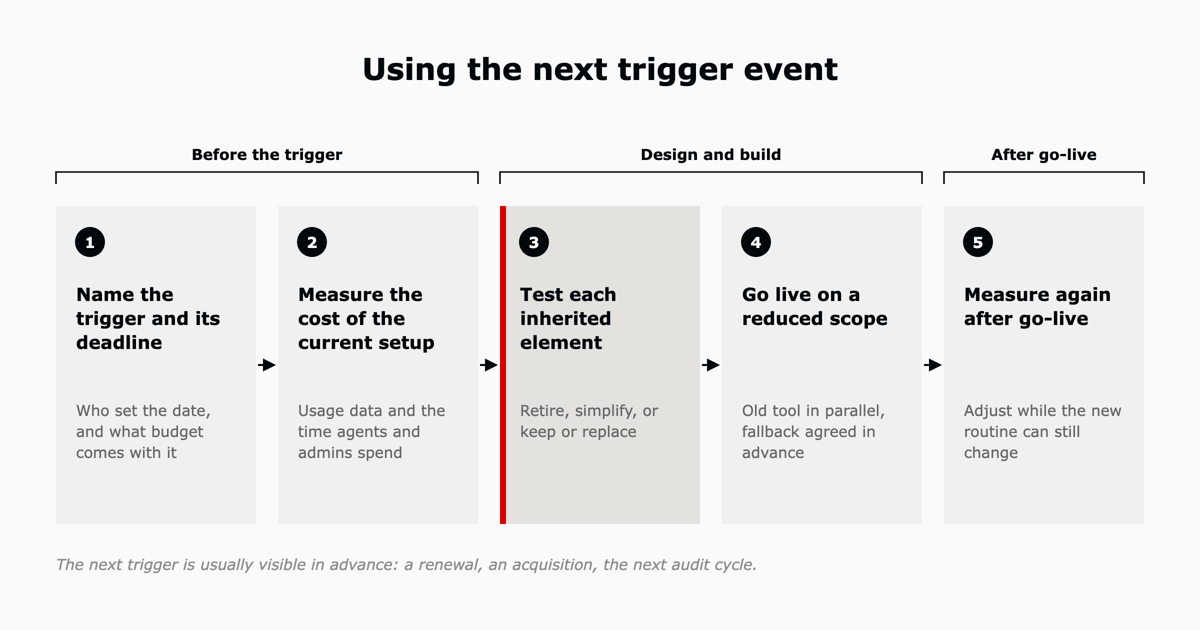
Write down what the event is, who set the date and how much budget comes with it. Once you know where a deadline came from, you also know how much room there is to move it.
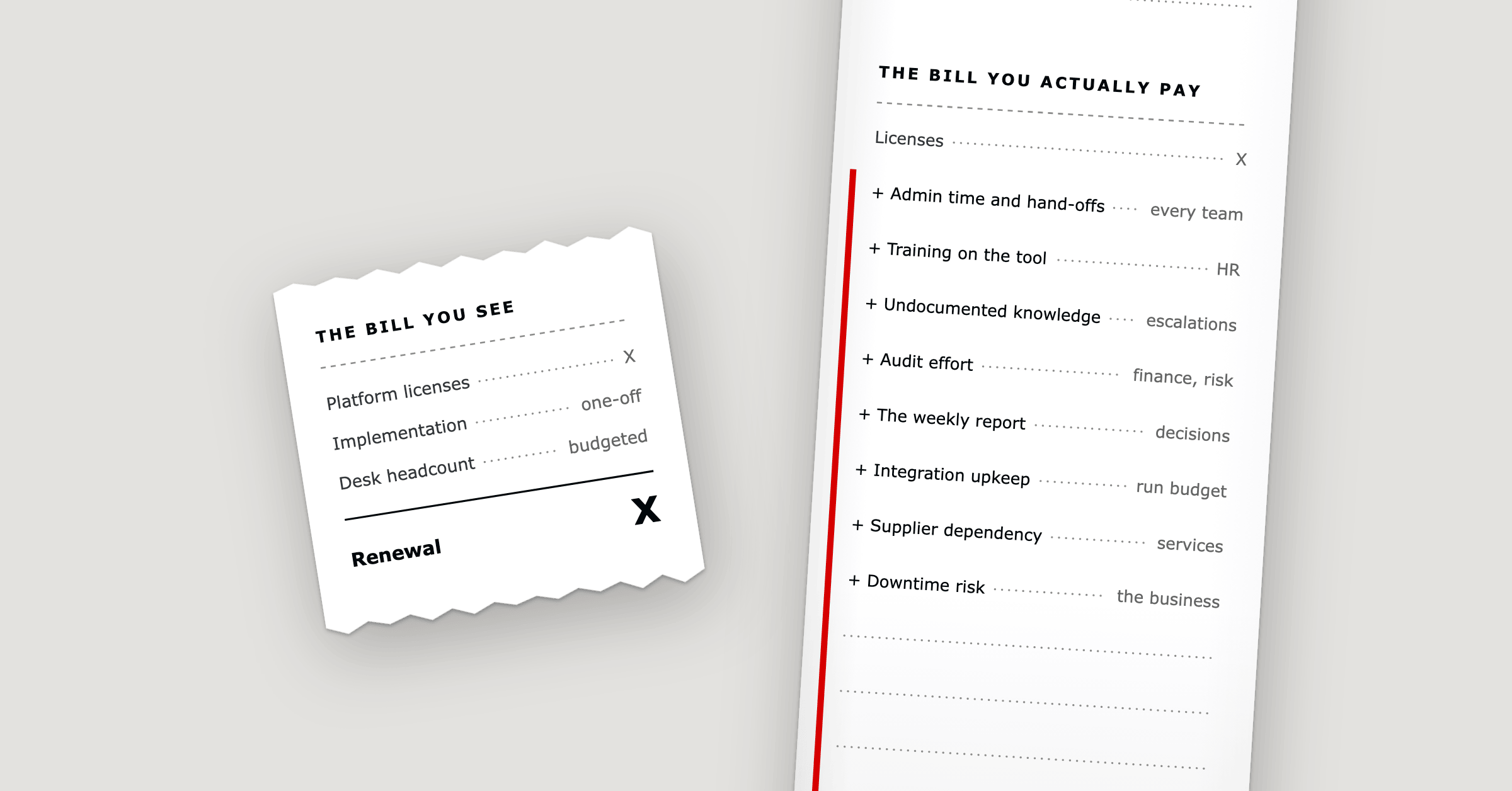
Pull usage data from the current tool and add up the time agents and administrators spend keeping it running. The total is often bigger than the license line suggests: the L5 white paper on fragmented service operations estimates that licensing, integration, internal IT management and vendor services together run 2.7 to 4.1 times the license line, and our article on the total cost of owning an ITSM platform breaks that down cost by cost.
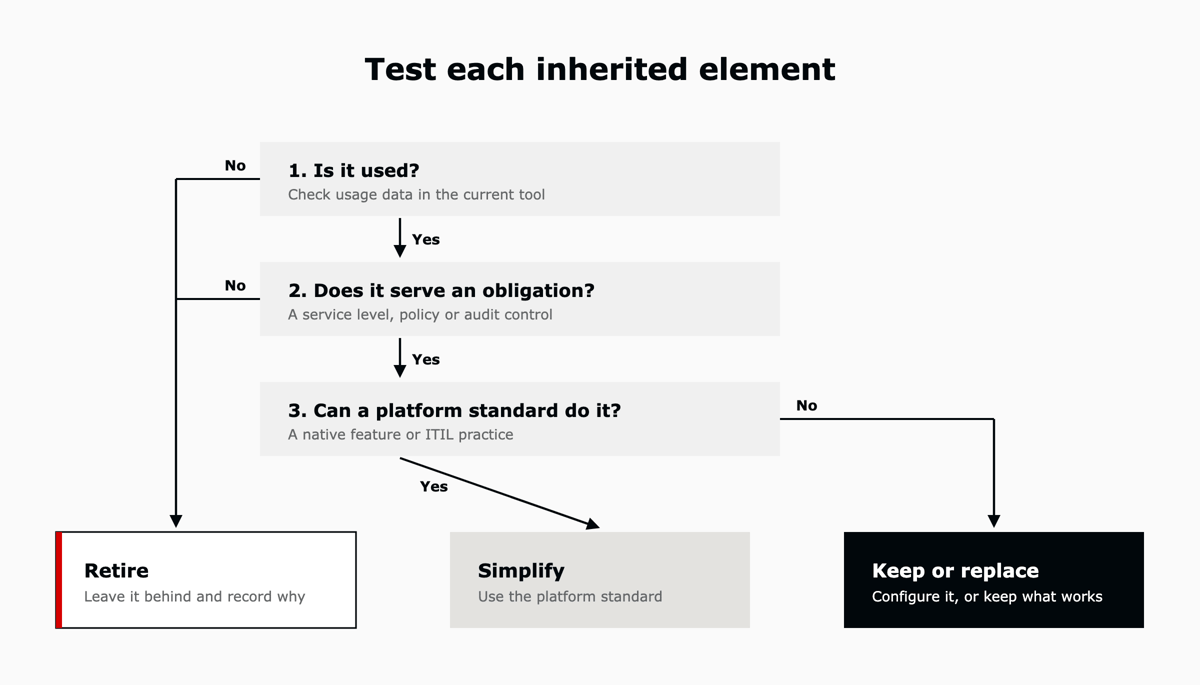
Take each field, form, rule, report and integration through the questions in the figure below, in order. Anything with no recorded use can be retired, and so can anything that serves no service level, policy or audit control. Where the platform has a standard way to do the job, use it; otherwise configure the element, or keep the system that already does it well.
Hold the date and shrink what goes live on it. Run the old tool alongside the new one for a fixed period, and agree the fallback before cutover.
In the first months, check the new routine against its agreed service levels and adjust it while it is still easy to change.
It is an event that forces a decision about your service platform, such as an acquisition, a carve-out, an audit finding, a license end date or a fixed go-live date. It comes with a deadline, and usually with the budget to meet it.
Copying is quicker to specify, and it brings the old workarounds with it. Routines form soon after go-live, and changing them gets harder from then on. Cutting the scope lets you keep the date and leave the workarounds behind.
Start with usage data from the tool you have today, then take each element through three questions: is it used, does it serve a service level, policy or audit control, and can a platform standard do the job.
If a renewal, an acquisition, an audit or a go-live date is coming up, the next step is knowing what the current setup costs and what is worth keeping. Book an assessment and walk away with a scorecard across five levels of AI maturity, a roadmap and a business case, in one week against a fixed scope.
L5 deploys and operates AI on purpose-built service management platforms, Zendesk, ClickUp, and Workday, for mid-market organizations, and stays accountable for what the system produces after go-live, every week.

The full article with its figures, tables and sources, set for reading offline, printing, and sharing.
On its way to your inbox You can also download it right now.
Download the PDF Last updatedKeep reading
Part of a series. This article is drawn from the L5 white paper on what a fragmented service portfolio really costs to r...
Read
Part of a series. This article is drawn from the L5 white paper on modernizing IT service management, and looks one laye...
Read
Part of a series. Why enterprise AI stalls is one article drawn from the L5 whitepaper on how people and AI resolve toge...
ReadField notes on AI operations and service management, direct to your inbox. New insights, the week we publish them.
No spam. Unsubscribe any time.