ClickUp for Construction Project Management
ClickUp works well for construction project management when it is set up around how a job actually runs: phases on a liv...
ReadHow healthcare teams use ClickUp for intake, credentialing, incidents, quality, and CME, and how its Enterprise plan supports HIPAA compliance with a signed BAA.
 L5 Team
Healthcare organizations use ClickUp to run the operational and administrative work around care in one workspace, and any workflow that touches patient data (PHI) belongs on ClickUp's Enterprise plan with a signed Business Associate Agreement (BAA). ClickUp is SOC 2 compliant, and its Enterprise plan supports HIPAA compliance, so the first decision is which workflows touch PHI and therefore need that plan.
Key takeaways
- ClickUp runs the work around care: patient intake, projects, credentialing, incidents, quality, inventory, policies, and CME.
- ClickUp is SOC 2 compliant, and its Enterprise plan supports HIPAA compliance with a signed BAA, which is where PHI belongs.
- HIPAA compliance is shared: ClickUp provides the controls, your team configures and enforces them.
- ClickUp Brain and other AI features are covered only when your BAA lists them, so keep PHI out of AI until confirmed.
- ClickUp works alongside your EHR rather than replacing it.
This guide covers the HIPAA rule that governs everything, the eight workflows healthcare teams build in ClickUp, the features that carry them, and the plan you actually need. Feature and plan facts are verified against ClickUp's healthcare and compliance documentation as of July 2026.
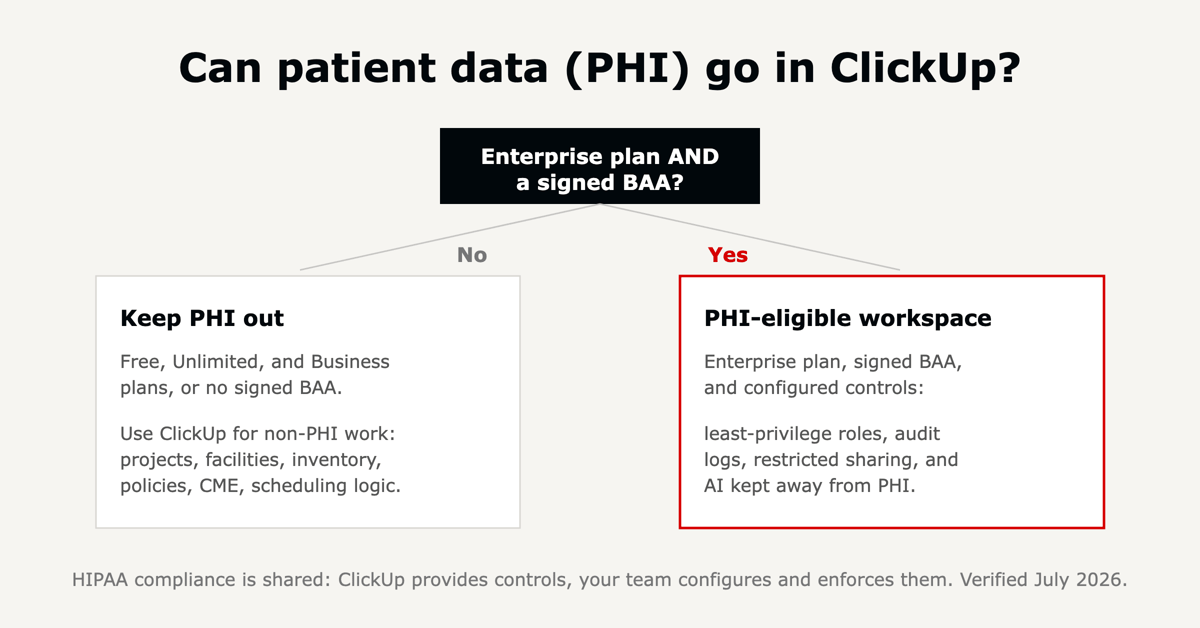
ClickUp can support HIPAA compliance. ClickUp is SOC 2 compliant, and its Enterprise plan is HIPAA compliant once your organization signs a Business Associate Agreement (BAA) with ClickUp and configures the workspace to meet the security and privacy requirements that agreement sets. HIPAA compliance is a shared responsibility: ClickUp provides the controls, and your team configures and enforces them.
The BAA and HIPAA support sit on ClickUp's Enterprise plan. The Free, Unlimited, and Business plans cover non-PHI work, so the practical rule is simple: put any workflow that contains PHI on the Enterprise plan under a BAA.
Signing the BAA is the start, not the finish. ClickUp provides the security capabilities: encryption, access controls, audit logging, data retention and deletion, and controls over public sharing. Your organization has to use them correctly, which means scoping PHI to the minimum necessary, setting least-privilege access with Custom Roles, training staff on where PHI is allowed to live, monitoring the audit log, governing every integration that could carry data out, and documenting your procedures.
ClickUp's AI features, including ClickUp Brain, are covered by your BAA only when it explicitly lists them as eligible. The safe practice is to keep PHI out of AI prompts until that coverage is confirmed, or to disable AI for users who handle PHI, and to confirm the current status with ClickUp in writing. Our overview of ClickUp Brain covers what the assistant does across a workspace.
ClickUp works alongside your electronic health record system rather than replacing it. It runs the operational and administrative work around care and connects to your EHR through intake forms and integrations, so record-update requests and clinical tasks flow into one place while the clinical source of truth stays in the EHR.
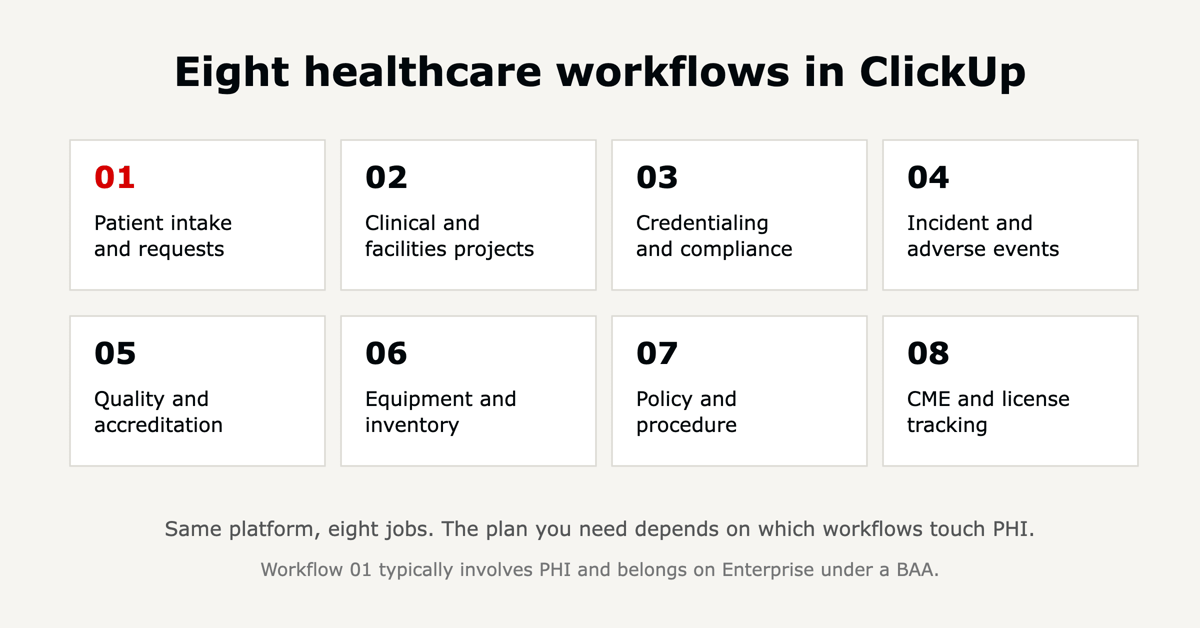
Each workflow pairs a healthcare job with the ClickUp features that carry it: Forms for intake, Custom Fields for structured data, Automations for routing and reminders, Views for how work is seen, Docs for reference, and Dashboards for oversight. Where a workflow can involve PHI, the Enterprise-and-BAA rule above applies.
ClickUp Forms turn requests into structured tasks. A referral, a records-release request, or an EHR-update request comes in through a Form, lands as a task with Custom Fields already filled, and gets routed to the right queue by an Automation, with reminders that keep requests from stalling.
In practice: a records-release request arrives through a ClickUp Form, lands as a task tagged with requester, record type, and due date, and an Automation routes it to the health-information-management queue with a turnaround reminder. This workflow usually carries PHI, so it belongs on Enterprise under a BAA with access limited to the staff who need it.
Complex initiatives run as projects with tasks, owners, dependencies, and Gantt timelines that make the critical path visible.
In practice: an EHR module rollout runs as one project with workstreams for build, training, and go-live, so the team can see which task slips the launch date. The same structure covers recurring facilities work; our piece on facilities management in healthcare goes deeper on maintenance and work orders.
Provider credentialing, license renewals, and facility inspections all run on deadlines. ClickUp tracks each item as a task with expiry dates in Custom Fields, recurring tasks for anything that renews, and Automations that send reminders before a lapse.
In practice: each provider's license and DEA registration is a task with an expiry date, and a Dashboard shows everything expiring in the next 90 days so nothing lapses unnoticed. Onboarding a new clinician fits the same pattern; see physician onboarding in ClickUp.
An incident report starts as a Form submission, becomes a task, and moves through investigation, root cause analysis, and corrective action with a clear owner at each stage.
In practice: a medication near-miss is logged through a Form, moves through investigation and root-cause statuses, and the timestamped history becomes the record for patient-safety review, without a separate reporting exercise.
Quality initiatives run as measured cycles: identify the issue, plan the change, measure the result, and standardize what works. ClickUp holds the tasks, the evidence in Docs, and the metrics in Dashboards.
In practice: a hand-hygiene improvement runs as a measured cycle, and the evidence sits in a Doc mapped to the accreditation standard it satisfies, so it is ready before survey rather than assembled at the last minute.
Supplies, medications, and equipment need par levels, reorder points, and expiry tracking. A Table view works as a lightweight inventory database, a Board view tracks items by status, and Automations trigger reorder tasks when a count drops.
In practice: a Board tracks crash-cart supplies by status, and an Automation opens a reorder task when a count falls below par, while equipment maintenance runs as recurring tasks so servicing does not slip.
ClickUp Docs centralizes policies and standard operating procedures with version history built in. A review workflow assigns each policy an owner and a review date, and staff acknowledgment is tracked as tasks.
In practice: an updated infection-control policy publishes in a Doc, and each staff member's acknowledgment is a task, so you can show who has read the current version.
Clinicians carry CME requirements tied to licensure. ClickUp tracks credits, module completion, and deadlines per person, with recurring tasks for annual cycles and a Dashboard for whole-team status.
In practice: each clinician's CME credits and renewal deadline live on a task, and a Dashboard shows who is short of the requirement before the licensing cycle closes. Our walkthrough of CME tracking in ClickUp covers the setup, and nursing informatics teams use the same approach for competency tracking.
The workflows above lean on a small set of ClickUp features. Here is what each one does in a healthcare context.
| ClickUp feature | What it does in healthcare |
|---|---|
| Custom Fields | Track structured data: PHI attributes, license expiry dates, task status. |
| Forms | Capture intake, referrals, records requests, and incident reports. |
| Custom Roles | Enforce least-privilege access to PHI (Enterprise). |
| Automations | Route work and send reminders before deadlines lapse. |
| Dashboards | Show what is due, overdue, and who is on track. |
| Docs | Centralize policies, SOPs, and reference material. |
| Audit log | Timestamp every change for a HIPAA audit trail (Enterprise). |
The plan decision follows one question: will the workflow ever contain PHI?
Match the plan to the most sensitive data any workflow will hold. For full plan costs, the annual discount, and the ClickUp Brain add-on, see our ClickUp pricing guide, and for the wider buyer questions, 30 ClickUp questions, answered. As a July 2026 snapshot, ClickUp runs Free at $0, Unlimited around $7 per user per month, Business around $12, and Enterprise at custom pricing, billed annually. HIPAA support sits on Enterprise.
Building these workflows once is the easy part. Keeping them running, and keeping PHI where the BAA allows it, is where most setups drift, because go-live gets treated as the finish line when it is the starting point.
As a ClickUp Diamond and Preferred Partner, L5 configures ClickUp around how a healthcare team actually works and then operates it week after week, so credentialing reminders, intake routing, and compliance dashboards keep working as needs shift. Our ACT methodology compressed ClickUp onboarding from 55 days to 7. For the platform basics and full feature set, see our complete ClickUp review.

Yes, on the Enterprise plan. ClickUp is SOC 2 compliant, and its Enterprise plan is HIPAA compliant with a signed Business Associate Agreement and a workspace configured for least-privilege access, audit logging, and restricted sharing. HIPAA compliance is shared: ClickUp provides the controls and your organization enforces them.
Yes, once you are on the Enterprise plan with a signed BAA and the workspace configured for it. Until that BAA is in place, keep PHI out of ClickUp on any plan, since security certifications alone are not a substitute for the agreement.
For work that never touches PHI, such as facilities, inventory, projects, and CME, Unlimited or Business is usually enough. For any workflow involving patient data, you need Enterprise with a BAA. Match the plan to the most sensitive data any workflow will hold.
ClickUp's AI features, including ClickUp Brain, are covered by your BAA only when it explicitly lists them as eligible. Keep PHI out of AI prompts until that coverage is confirmed, or disable AI for users who handle PHI, and confirm the current status with ClickUp in writing.
ClickUp works alongside your electronic health record rather than replacing it. It runs the operational and administrative work around care and connects to your EHR through forms and integrations, while the clinical record stays in the EHR.
Yes. Nursing, physician, and support teams use ClickUp to coordinate tasks, schedules, and documentation in one place, with Calendar and Workload views for balancing assignments. Any board that includes patient identifiers still needs the Enterprise-and-BAA setup.
ClickUp can manage scheduling logic, appointment tasks, and automated reminders, which helps reduce no-shows and double-booking. It is not a dedicated clinical scheduling or EHR system, so most teams use it alongside those tools and keep patient identifiers on Enterprise under a BAA.
Start by separating PHI workflows from non-PHI workflows, since that decides your plan. Build the non-PHI workflows first, put PHI workflows on Enterprise under a BAA with least-privilege roles, and design the workspace around your actual processes rather than a generic template.
HIPAA, feature, and plan details verified against ClickUp's healthcare and compliance documentation in July 2026. ClickUp updates features, plans, and terms regularly; confirm current specifics at clickup.com before you rely on them.

The full article with its figures, tables and sources, set for reading offline, printing, and sharing.
On its way to your inbox You can also download it right now.
Download the PDF Last updatedKeep reading
ClickUp works well for construction project management when it is set up around how a job actually runs: phases on a liv...
Read
Most ClickUp implementations do not fail on the software, they stall on the rollout: too many features switched on at on...
Read
Last verified July 2026. Connecting ClickUp to Make.com takes about five minutes and no code. You create a scenario in M...
ReadField notes on AI operations and service management, direct to your inbox. New insights, the week we publish them.
No spam. Unsubscribe any time.