The Endpoint and the Service Desk, Run as One System
Part of a series. This article is drawn from the L5 whitepaper on how people and AI resolve together, and looks at the l...
ReadWhy hardware tickets start with 20 questions, which ones endpoint data can answer, and five steps to put device details in the ticket first.
 Divyansh Agrawal
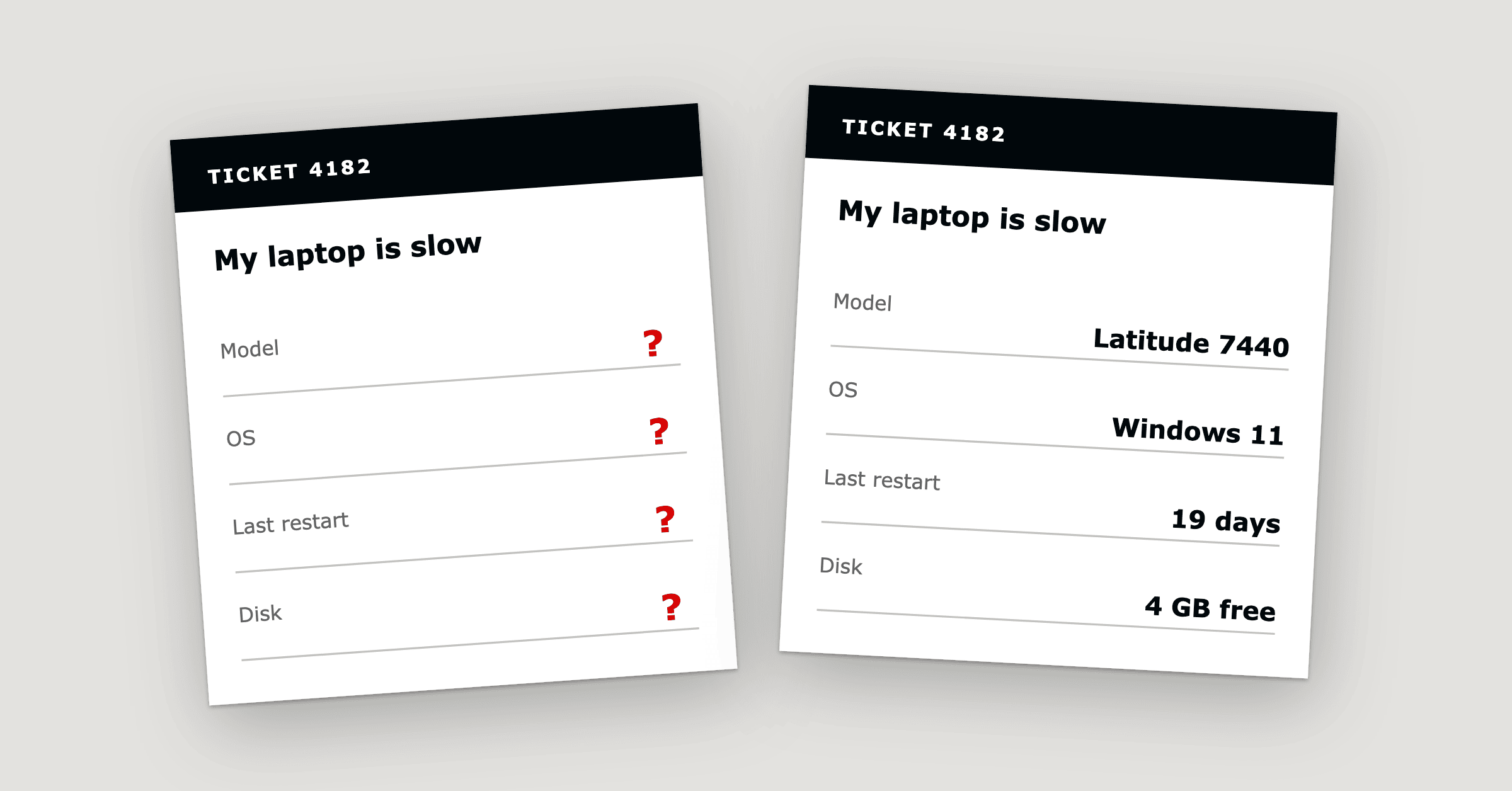
Hardware ticket troubleshooting starts with 20 questions because the details a technician needs, such as the serial number, operating system version, patch status and hardware health, sit in the endpoint management platform while the ticket sits in the service desk. The agent asks the employee instead. By our count, for a typical laptop incident, connected endpoint, asset and monitoring data can fill in or narrow down 18 of the 20 questions, depending on the integrations in place and the quality of the data.
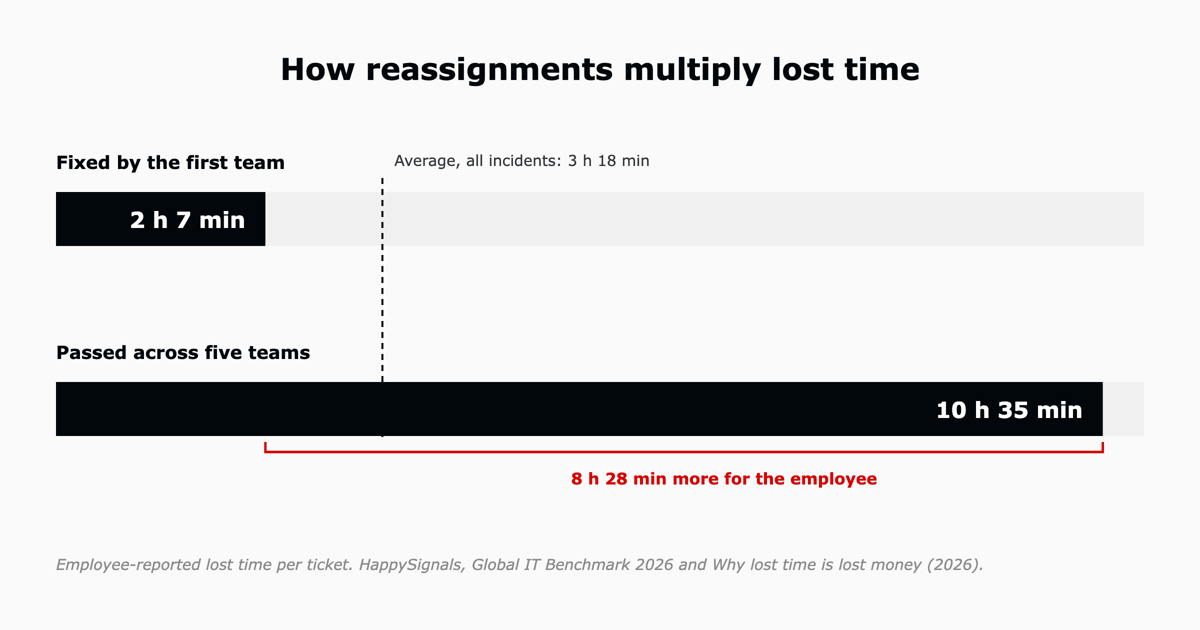
Each unanswered question waits in a queue. In the HappySignals Global IT Benchmark 2026, employees reported losing an average of 3 hours 18 minutes per IT incident in 2025, up from 3 hours 3 minutes in 2021.1 This article lists the 20 questions, shows where each answer can come from, and sets out five steps to take them out of intake.
A hardware support ticket needs 20 details covering device identity, configuration, hardware health, ownership, network connection and the symptoms the employee reports. With those details in the ticket, IT teams can diagnose problems without contacting the employee again and again. Endpoint telemetry fills in 12, asset, directory and log data narrow down six, and two need the employee.
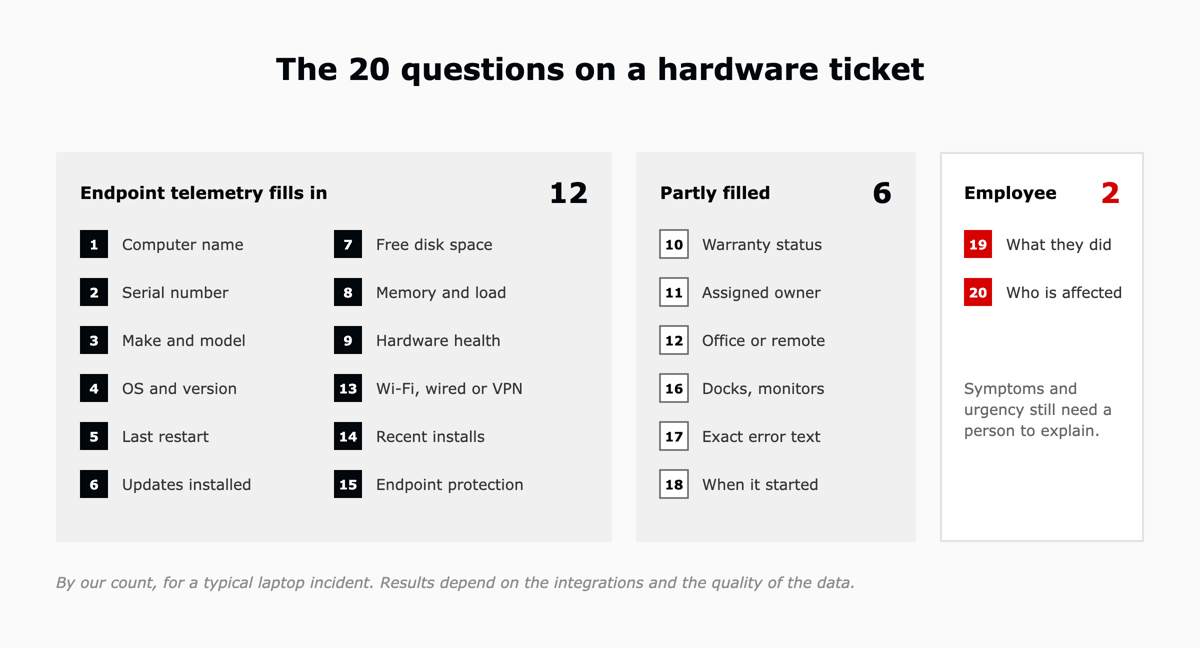
The table lists each question with the source that can answer it once the endpoint platform is connected to the ticket.
| Question | Answered by |
|---|---|
| 1. What is the computer name or asset tag? | Endpoint telemetry |
| 2. What is the serial number? | Endpoint telemetry |
| 3. What make and model is it? | Endpoint telemetry |
| 4. Which operating system and version is it running? | Endpoint telemetry |
| 5. When did it last restart? | Endpoint telemetry |
| 6. Are the latest updates installed? | Endpoint telemetry |
| 7. How much free disk space is there? | Endpoint telemetry |
| 8. How much memory is installed, and how loaded is it? | Endpoint telemetry |
| 9. Is the disk or battery reporting a health warning? | Endpoint telemetry |
| 10. Is the device under warranty? | Partly, from a current warranty record |
| 11. Who is the assigned owner? | Partly, from the asset or directory record |
| 12. Is the device in the office or working remotely? | Partly, from network data |
| 13. Is it on Wi-Fi, a wired connection or VPN? | Endpoint telemetry |
| 14. Was any software installed or changed recently? | Endpoint telemetry |
| 15. Is endpoint protection running? | Endpoint telemetry |
| 16. Which docks, monitors or peripherals are connected? | Partly, depending on the endpoint platform |
| 17. What is the exact error message? | Partly, from event logs |
| 18. When did the problem start? | Partly, from alert history |
| 19. What was the employee doing when it happened? | The employee |
| 20. Who else is affected, and how urgent is it? | The employee |
Identifying the device is often the first hurdle. The University of Michigan's IT knowledge base, for example, tells its users that ITS "may request the serial number or computer name from your University-owned computer."2
Hardware ticket automation is the process of collecting device information from an endpoint management platform and adding it to IT support tickets automatically. It helps service desk agents identify the device, review its hardware health and start diagnosis without asking the employee for details the platform already holds.
The data it draws on is endpoint telemetry: information collected from computers and other devices, including operating system details, patch status, hardware health, disk usage and security status. Alerts from that telemetry can also open tickets on their own, before the employee notices a problem.
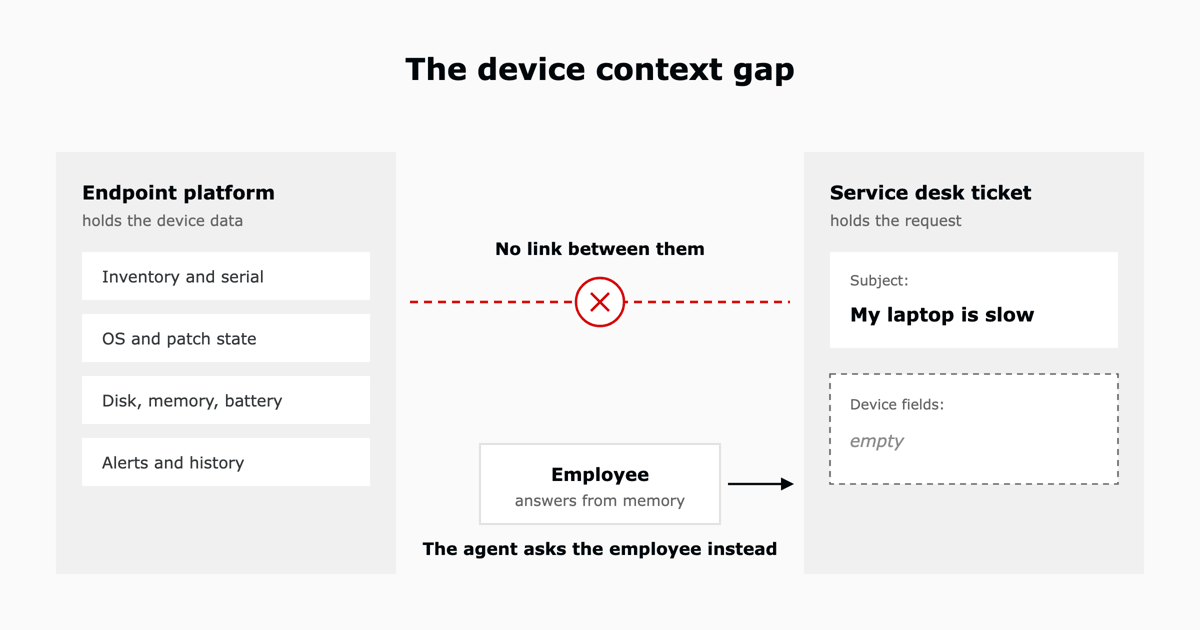
The agent asks because the device data and the ticket live in different systems. An endpoint management platform such as NinjaOne records inventory, patch state, hardware health and alerts, and a service desk such as Zendesk records the incident. Unless the two platforms are connected, the ticket only knows what the employee typed into it.
Zendesk, May 2026. Managing IT assets was often "forcing agents to switch between tools and dig through spreadsheets to understand an employee's tech stack."3
At L5, we treat this as an integration and workflow design problem. Connecting endpoint data to service desk workflows gives agents the device context before troubleshooting begins. It is also one of the ITSM pain points holding teams back. On a discovery call, a firm told us its existing configuration database did not work and that its data quality was poor.9
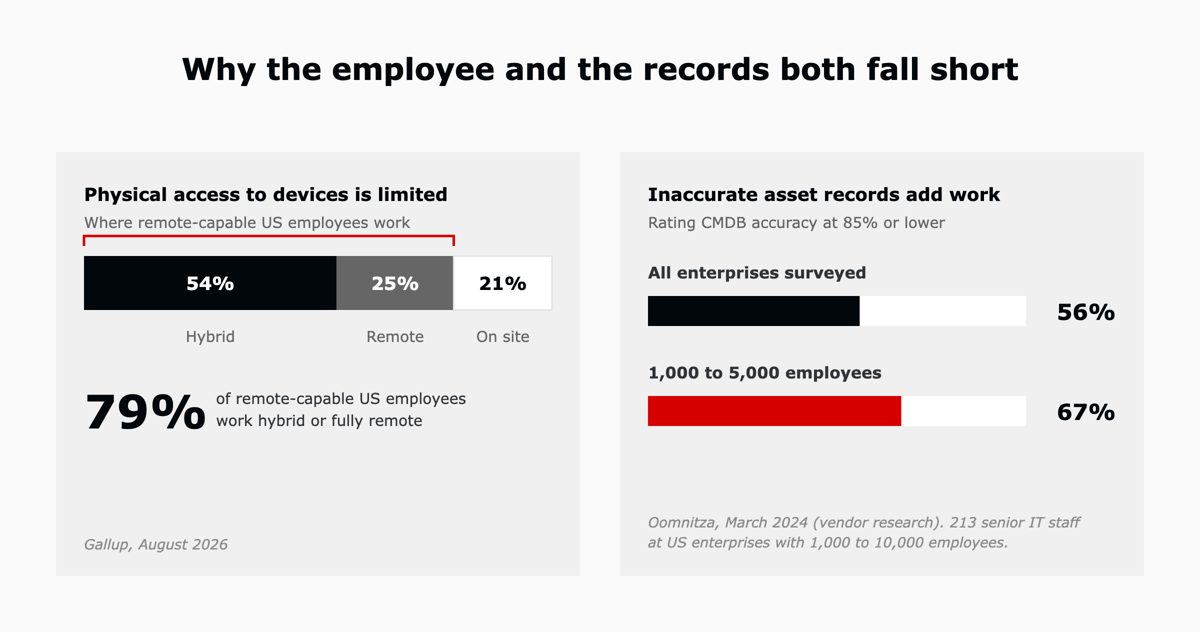
Walking over to read the asset tag only works for employees on site. In August 2026, Gallup found that 54 percent of remote-capable US employees worked hybrid, 25 percent worked fully remote and 21 percent worked on site.4 For the 79 percent who work hybrid or fully remote, on many days the employee has to find the answer and type it in.
An asset or configuration record is only useful when it matches the device. In a 2024 Oomnitza survey of 213 senior IT professionals at US enterprises with 1,000 to 10,000 employees, 56 percent rated the accuracy of their configuration management database (CMDB) at 85 percent or lower, rising to 67 percent among enterprises with 1,000 to 5,000 employees.5 When a copied record is out of date, the agent asks again.
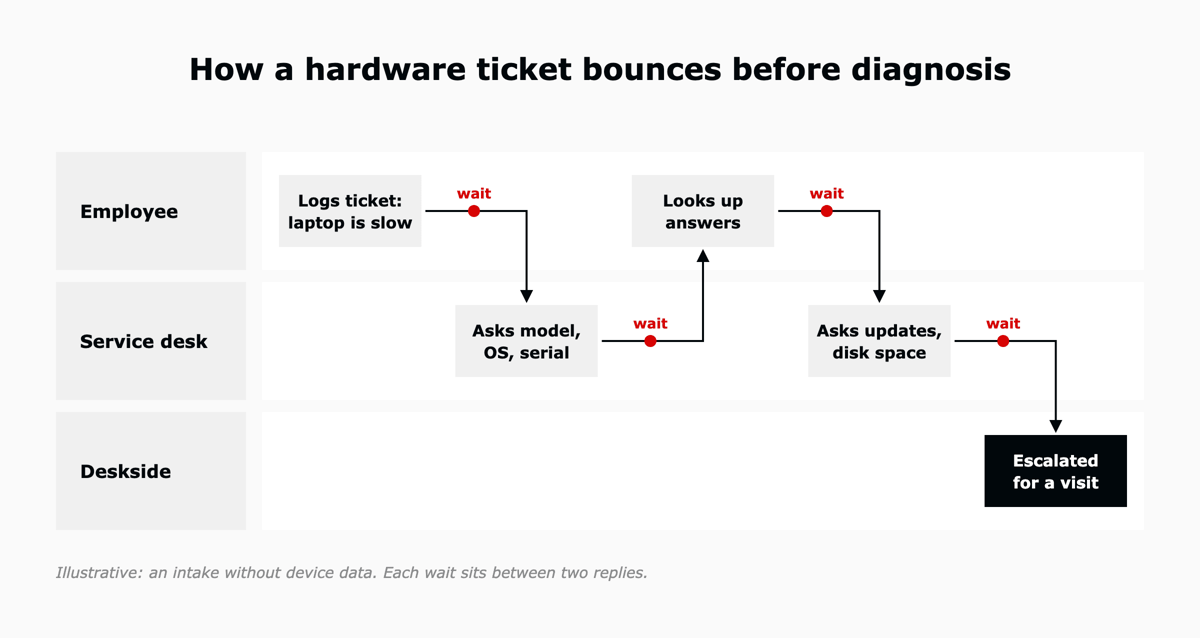
The back-and-forth costs employee time and IT capacity. Each round of questions waits in a queue for the employee to reply, and each handoff to another team adds hours before the device is fixed. The effect shows up in two places: the time lost when tickets are reassigned, and how employees judge the support they receive.
In HappySignals data published in 2026, a ticket fixed by the first team cost the employee about 2 hours 7 minutes, while one passed across five teams cost 10 hours 35 minutes.6 The 2026 benchmark found that 13.3 percent of tickets were reassigned two or more times, and that this is where lost time grows fastest.1
Employees mentioned speed far more often than the fix itself. "Speed of support" made up 29.2 percent of the experience factors employees selected after an incident, against 6.6 percent for "Solving the ticket".1 For IT teams, removing waits during intake can improve how support feels as much as a faster repair. These delays are part of the hidden cost of fragmented service operations.
With device context available at intake, agents can begin troubleshooting sooner, with fewer information requests and fewer avoidable handoffs. The ticket opens with the device, its configuration and its health filled in, so the agent confirms the partly filled details and asks the employee only what the data cannot show.
Each platform plays a different part. NinjaOne supplies the device telemetry: its Zendesk integration, launched on April 8, 2025, turns NinjaOne alerts into Zendesk tickets and lets technicians open a remote session to a device from inside the ticket.7 Zendesk IT asset management, generally available since May 11, 2026, keeps the asset record, with status, assignment, location and warranty inside ticket workflows.3 Neither fills in all 20 questions by default. Which fields appear in the ticket depends on how the integration and field mapping are configured.
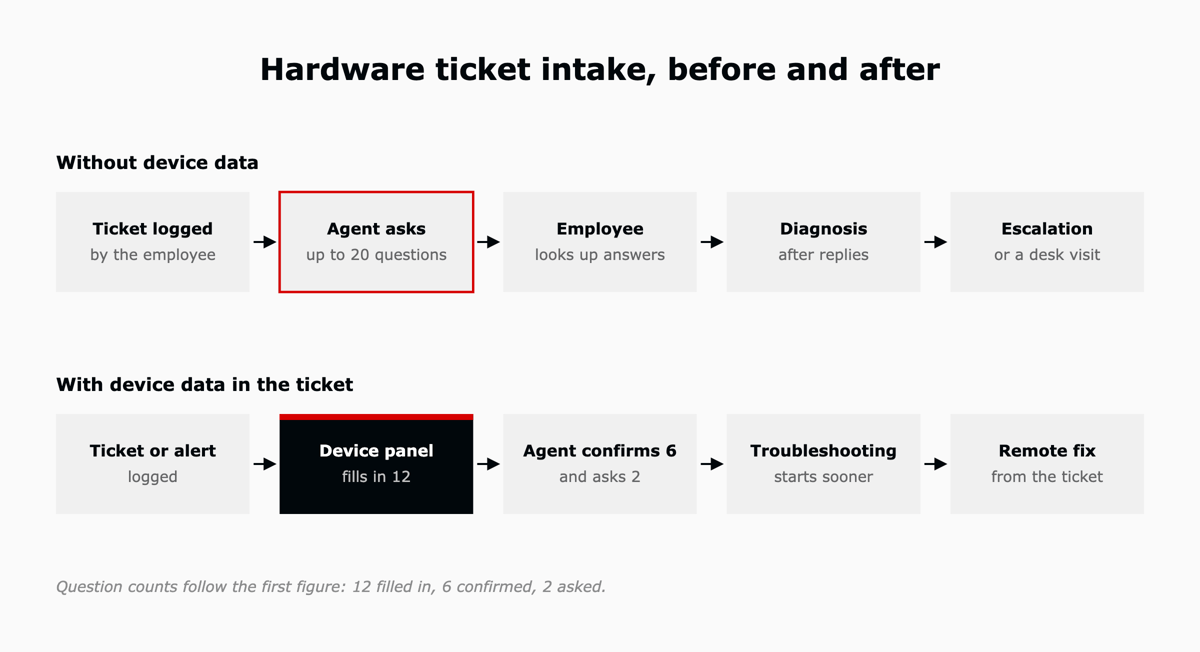
| Intake step | Asking the employee | Reading endpoint data in the ticket |
|---|---|---|
| First contact | Agent requests the computer name and serial number | Device matched to the requester when the ticket opens |
| Configuration | Employee opens settings and reports the OS version | OS, patch state and recent installs shown in the ticket |
| Health | Employee describes "slow" in their own words | Disk, memory and hardware health shown with alert history |
| Fix | Escalation or a desk visit | Remote session launched from the ticket |
AI agents triaging hardware tickets need the same device fields, a point our article on how legacy service stacks hold back AI covers in more depth.
You reduce the questions on a hardware ticket by treating device context as a design job with five steps, run in order. Each step supports one ITIL (Version 5) management practice. ITIL (Version 5) keeps the 34 management practices, and its Monitor, Support and Fulfil module covers Incident Management and Monitoring and Event Management.8
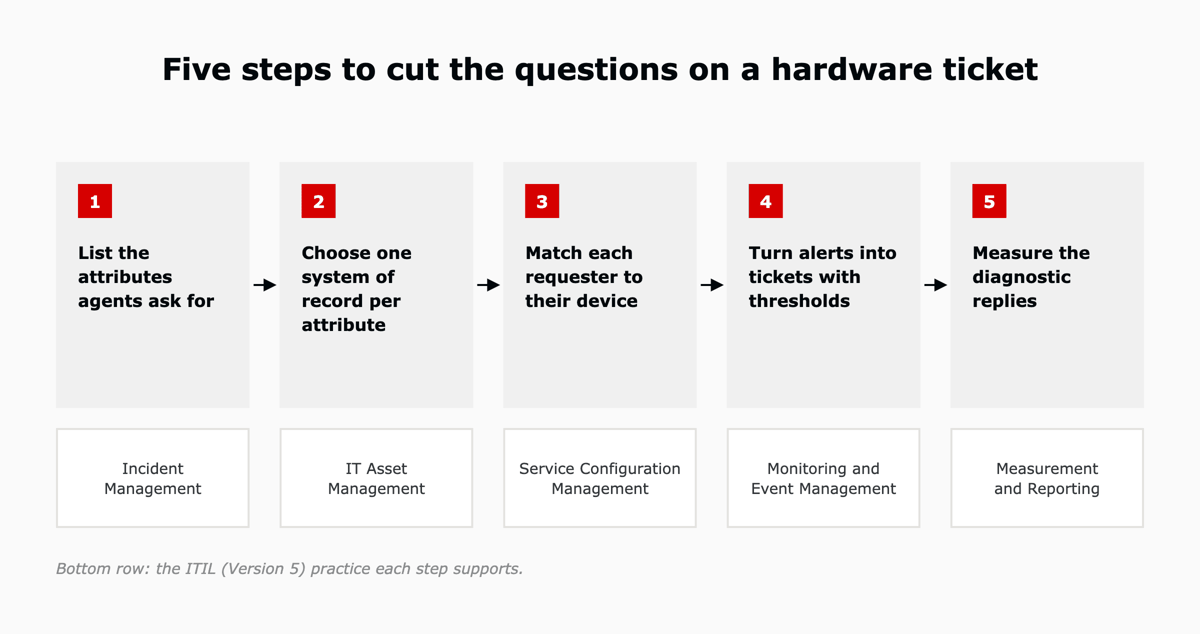
The service desk lead pulls the last 50 hardware tickets and marks every question asked before diagnosis. The result is the minimum set of device fields a hardware incident should carry when it opens. This supports Incident Management.
A system of record is the one platform trusted as the source for a field. Assign the endpoint platform to serial number, OS and patch state, and the asset record to warranty and owner. One owner per field prevents sync loops that overwrite good data. This supports IT Asset Management.
Map employees to devices using the directory and the endpoint inventory, and keep the mapping current as devices change hands. When someone holds a laptop and a desktop, the agent asks which one, and skips asking for two serial numbers. This supports Service Configuration Management.
Decide which monitoring conditions create a ticket, which update an open one and which resolve it when the condition clears. Start with disk space, battery health and failed patches, and tune the thresholds after the first month so warnings do not flood the queue. This supports Monitoring and Event Management.
Count agent replies before the first diagnosis on hardware tickets for a month before the change and a month after it. The difference shows whether device data is replacing questions. This supports Measurement and Reporting.
The metrics that show the questions going away count replies and handoffs on hardware tickets, measured before and after device data reaches the ticket. The employee's lost time, from a short survey after the ticket closes, shows how the change feels to the people asking for help.
| Metric | How to measure it | What it shows |
|---|---|---|
| Diagnostic replies per hardware ticket | Agent replies before the first diagnosis note | Whether device data replaced questions |
| First contact resolution for hardware | Share of hardware tickets resolved without a second contact | Whether the first agent had enough to act |
| Escalations to deskside | Hardware tickets sent for a desk visit | Whether remote diagnosis and remote fixes work |
| Lost time per incident | Short survey after the ticket closes | How the employee experienced the wait |
A hardware support ticket should include the computer name, serial number, make and model, operating system version, patch status, free disk space, hardware health, assigned owner and network connection, plus what the employee was doing and who else is affected. With an endpoint platform connected, most of these fields can fill in automatically.
Endpoint telemetry is data collected from computers and other devices, including operating system details, patch status, hardware health, disk usage and security status. IT support teams use it to diagnose device problems without asking the employee for those details.
Yes. NinjaOne's Zendesk integration, launched on April 8, 2025, turns NinjaOne alerts into Zendesk tickets, using templates that set how tickets are created and mapped. Technicians can also open a remote session to the device from inside the Zendesk ticket.
Yes. Zendesk IT asset management became generally available on May 11, 2026. It tracks asset status, assignment, location and warranty inside ticket workflows, so agents can see an employee's devices from the ticket.
IT teams can reduce resolution time by putting device data in the ticket at intake, routing hardware tickets to the right team first and fixing remotely from the ticket. In HappySignals data published in 2026, a first-team fix cost employees about 2 hours 7 minutes, against 10 hours 35 minutes across five teams.
NinjaOne supplies the device telemetry and Zendesk runs the ticket, and the two connect through NinjaOne's Zendesk integration. L5 is a Zendesk Preferred Partner and a NinjaOne partner, and offers Zendesk and NinjaOne as one operated bundle on AWS Marketplace. In the bundle, L5 configures the integration, including the device details agents see in the ticket, and as the operator keeps tuning the automation and the data flows between the two platforms after go-live.
The first step is finding out which of the 20 questions your setup already answers. Book an assessment and you walk away with a scorecard, a roadmap and a business case, in one week against a fixed scope.

The full article with its figures, tables and sources, set for reading offline, printing, and sharing.
On its way to your inbox You can also download it right now.
Download the PDF Last updatedKeep reading
Part of a series. This article is drawn from the L5 whitepaper on how people and AI resolve together, and looks at the l...
Read
In ITSM, endpoint management is how an IT team keeps a record of the devices that connect to the business, keeps them up...
Read
Ask the leader of any mid-market technology, professional services, or healthcare organization whether they have impleme...
ReadField notes on AI operations and service management, direct to your inbox. New insights, the week we publish them.
No spam. Unsubscribe any time.