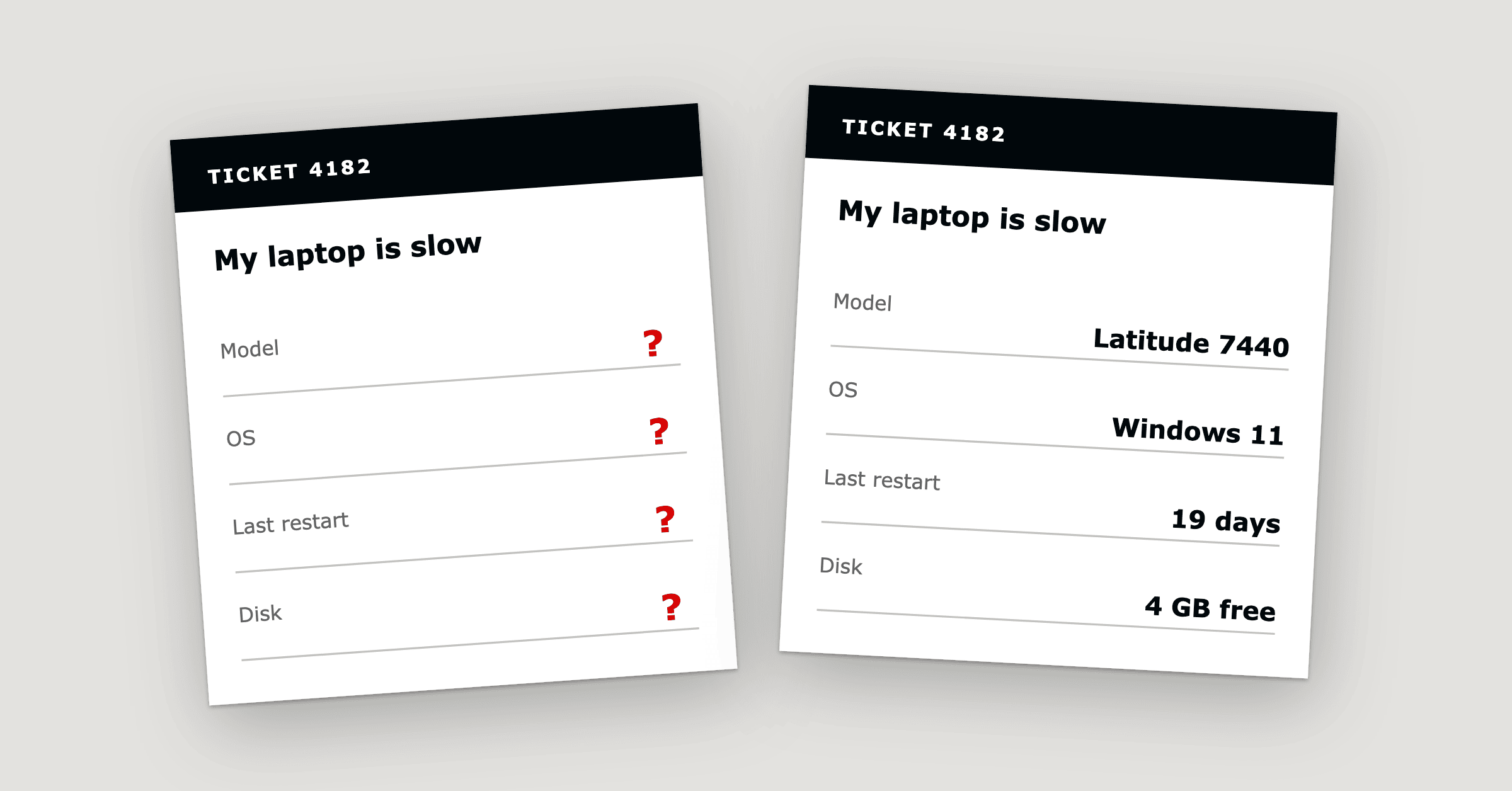
Why Every Hardware Ticket Starts With 20 Questions
Hardware ticket troubleshooting starts with 20 questions because the details a technician needs, such as the serial numb...
ReadWhat endpoint management is, its four core jobs (inventory, patching, monitoring, remote access), how the agent works and where the service desk fits.
 Amey Negandhi
In ITSM, endpoint management is how an IT team keeps a record of the devices that connect to the business, keeps them updated and healthy, and fixes them without a site visit. It covers four jobs: inventory (knowing what you have), patching (keeping it up to date), monitoring (spotting problems early) and remote access (fixing problems from wherever the technician is). A small program called an agent runs on each device and reports to one platform, and the service desk uses that record when someone raises a ticket.
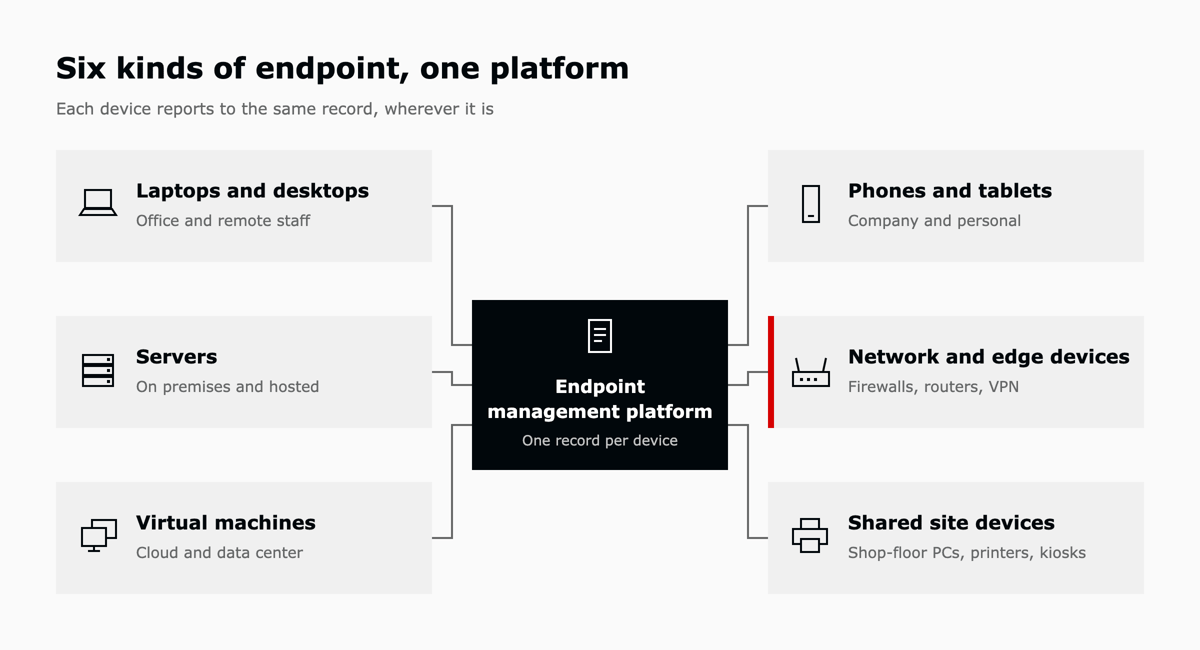
An endpoint is any device that connects to the company network and could be used, or attacked, as a way in. Laptops and desktops come to mind first. The full list also includes servers, virtual machines, phones and tablets, network and edge devices such as firewalls, routers and VPN appliances, and shared site devices such as shop-floor PCs, printers and kiosks.
Where people work changes how those devices are looked after. In August 2026, Gallup found that 54 percent of remote-capable US employees worked hybrid, 25 percent worked fully remote and 21 percent worked on site.1 A laptop that spends half its week on home broadband has to be managed over the network, because IT staff may rarely see it in person.
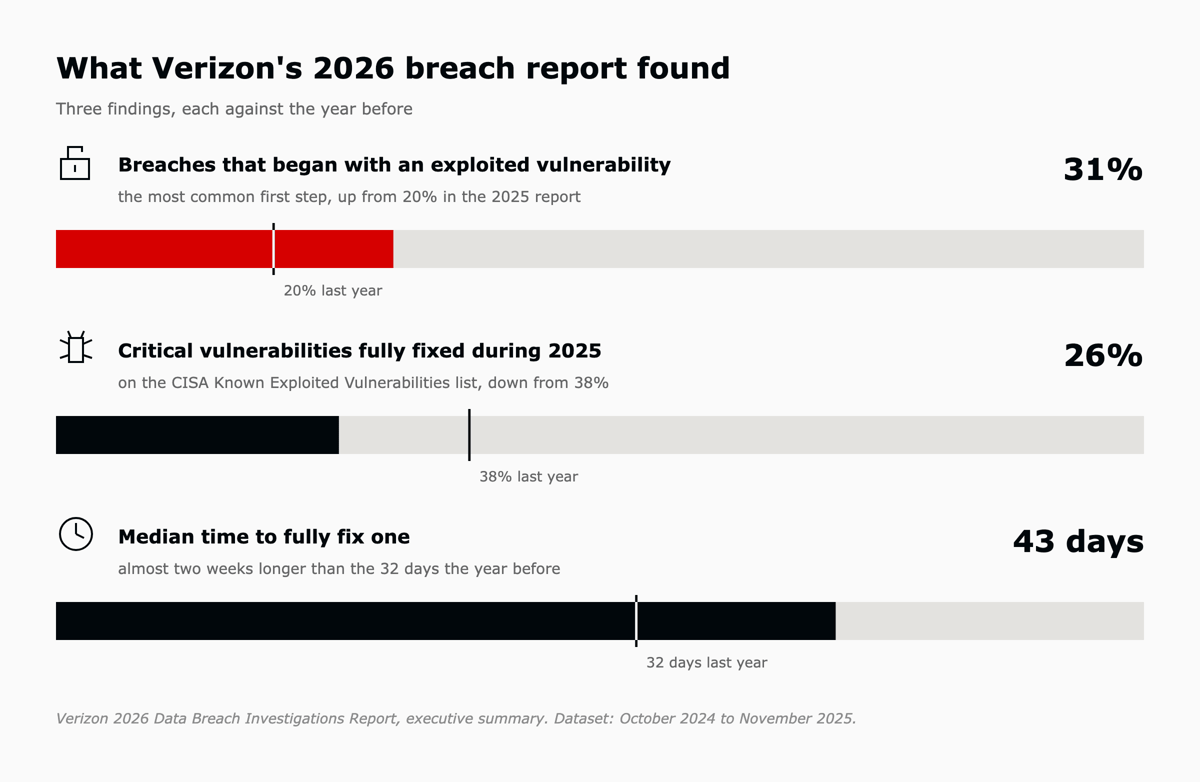
Endpoint management matters because out-of-date and untracked devices give attackers a way in. In Verizon's 2026 Data Breach Investigations Report, exploiting a vulnerability became the most common first step in a breach, at 31 percent of breaches with a known way in, up from 20 percent in the previous report.2
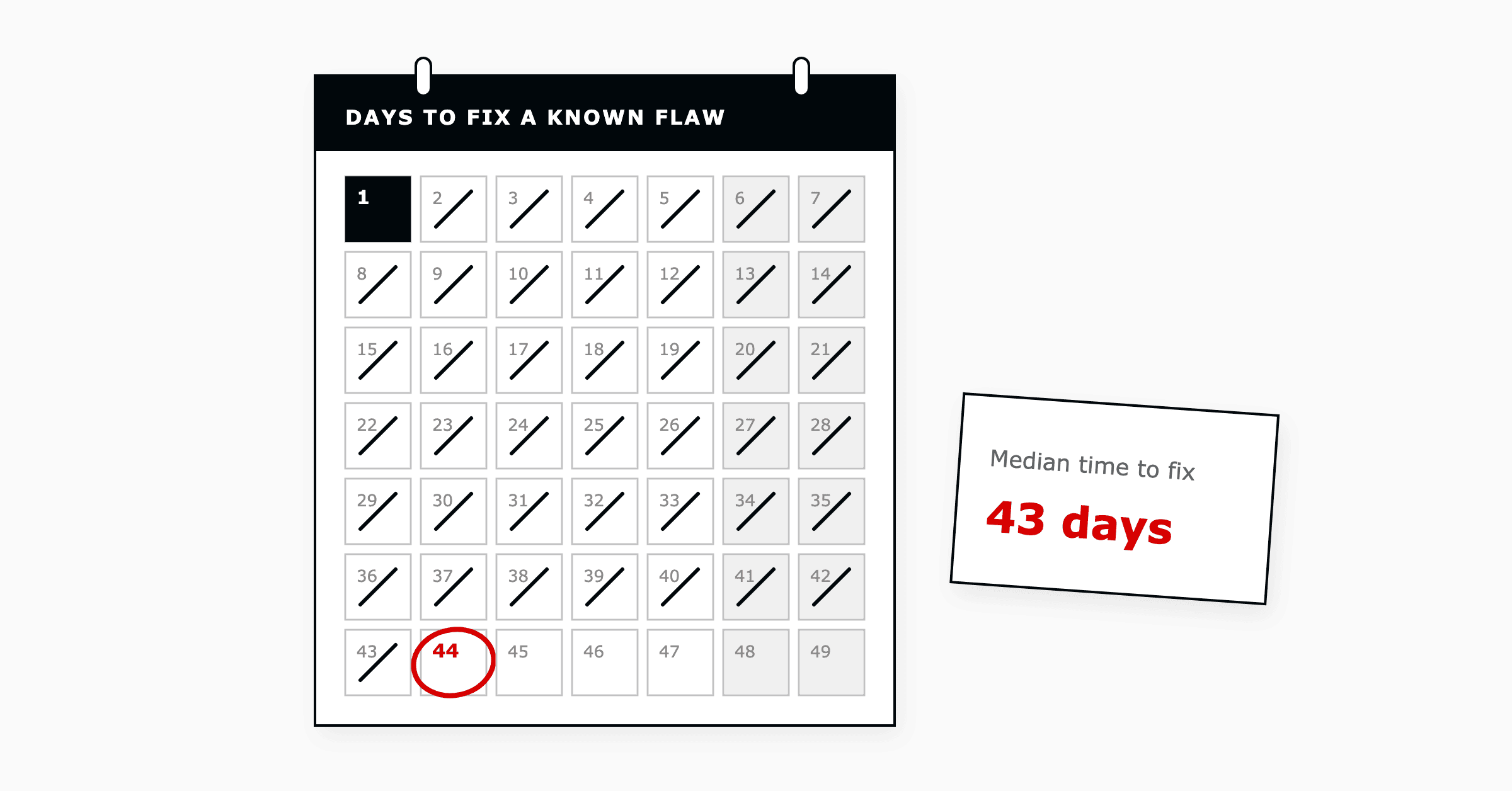
Fixing those weaknesses took longer. Organizations fully fixed only 26 percent of the most serious vulnerabilities, those on the US government's Known Exploited Vulnerabilities list, during 2025, down from 38 percent the year before. The median time to fix one rose to 43 days, from 32.2
The service desk sees the same gap from the other side. When a technician cannot see a device's details, health and patch status, the first questions on a hardware ticket go back to the user, which is why every hardware ticket starts with 20 questions and one of the ITSM pain points that slow support teams down.
The four core jobs are inventory, patching, monitoring and remote access. Each one answers a single question about the estate, and each relies on the one before it: a team cannot patch a device it does not know about, and remote access helps most when monitoring has already pointed to the device that needs attention.
The four jobs also line up with ITIL (Version 5), which PeopleCert released in January 2026 and which frames IT work around the end-to-end lifecycle of digital products and services.3 Each job supports one or more of its management practices.4
| Endpoint job | ITIL (Version 5) practice it supports | What the practice gets |
|---|---|---|
| Inventory | IT Asset Management, Service Configuration Management | A current record of each device and its software |
| Patching | Change Enablement, Deployment Management | Updates that are risk-assessed, authorized and installed on schedule |
| Monitoring | Monitoring and Event Management | Changes on a device recorded and reported as events |
| Remote access | Incident Management, Service Request Management | Fixes and requests completed without a site visit |
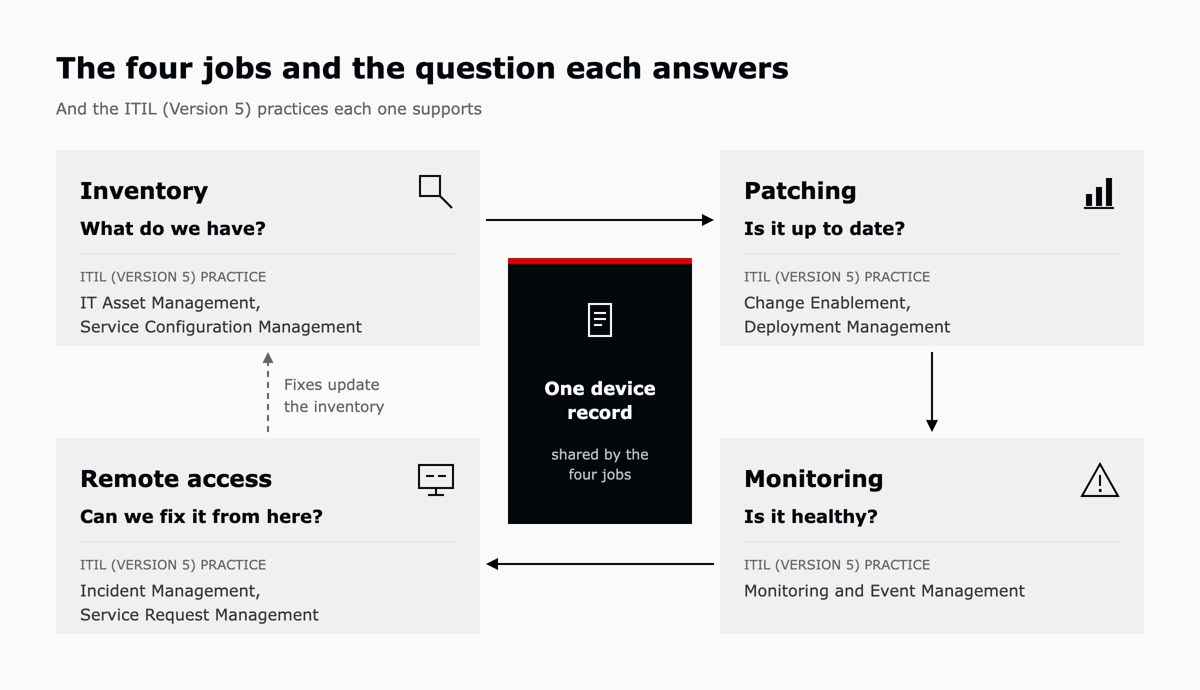
Inventory is the list of devices, with enough detail to act on. The Center for Internet Security puts it first of its 18 critical controls, Inventory and Control of Enterprise Assets, on the reasoning that an organization cannot defend what it does not know it has.5 The agent collects the inventory automatically, so the record stays current when a laptop is reimaged or someone installs new software. That record is the raw material for the IT Asset Management practice, which plans and manages the lifecycle of IT assets.4
| What the inventory records | Example | How the service desk uses it |
|---|---|---|
| Device and serial number | 14-inch laptop, serial ending 4F2K | Identifies the right device on a ticket without asking the user |
| Owner and location | Finance, head office | Routes the ticket, and plans a site visit only when one is needed |
| Installed software | Office suite, VPN client, ERP client | Confirms a version before troubleshooting an application |
| Warranty and purchase date | Warranty ends March 2027 | Informs the choice between repair, replacement and a vendor claim |
| Last check-in | Seen 12 minutes ago | Shows whether the device is online before connecting |
Patching means finding, testing and installing the updates that vendors release to fix bugs and security vulnerabilities. NIST titles its patch planning guide Preventive Maintenance for Technology, and treats patching as routine upkeep that is planned and paid for like any other maintenance.6 Updates go to a small pilot group first, then to the wider estate in an agreed maintenance window so people are not interrupted mid-task.
In ITIL (Version 5), the approval step belongs to the Change Enablement practice, which assesses risk, authorizes changes and manages the change schedule.4 Routine patching is low risk and done the same way each time, so many teams pre-authorize it as a standard change and skip a fresh approval each cycle. The Deployment Management practice then covers moving the update onto live devices.4
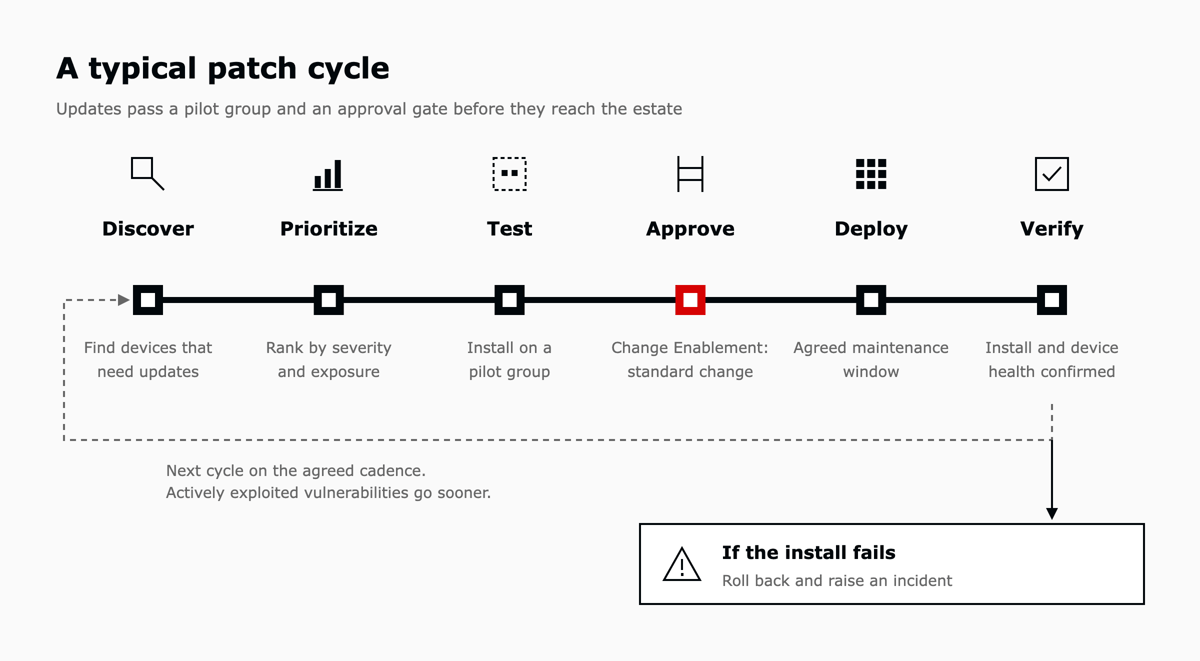
When a patch fails to install, the device is rolled back or repaired, and the failure reaches the service desk as an incident so that the user does not discover it first.
Monitoring checks each device against a set of conditions and raises an alert when one is breached. Typical conditions are disk space below a set level, a security service that has stopped, a failed backup, a battery reporting poor health and a device that has not checked in for several days. This is the device-level work of the Monitoring and Event Management practice.4
Each condition needs a threshold, and each threshold needs an owner. A threshold set too tight floods the queue with alerts nobody acts on, and one set too loose reports a failure after the user has already noticed it. Teams usually start with a short list, review which alerts led to real work after the first month, and adjust from there.
An alert is only useful if it reaches someone. Most platforms can send an alert to a dashboard, an email or, through an integration, the service desk as a ticket with the device attached. Routing alerts as tickets puts them in the same queue, with the same priorities and service levels, as the requests people raise.
Remote access lets a technician connect to a device over the network to view the screen, run a command or change a setting, wherever the device is.
Remote access needs its own controls. Technicians sign in with multi-factor authentication, users are asked for consent before a visible session starts, and each session is logged so it can be reviewed later. With those controls in place, many fixes that once needed a site visit can be made from the service desk, which serves the Incident Management practice and its aim of restoring normal service as quickly as possible.4
The agent checks in with the platform on a schedule and sends facts about the device, its health and its patch status. In return, the platform sends policies, patch jobs and scripts for the agent to run. The device starts each connection, so the same set-up works for laptops at home or on the road as well as in the office.
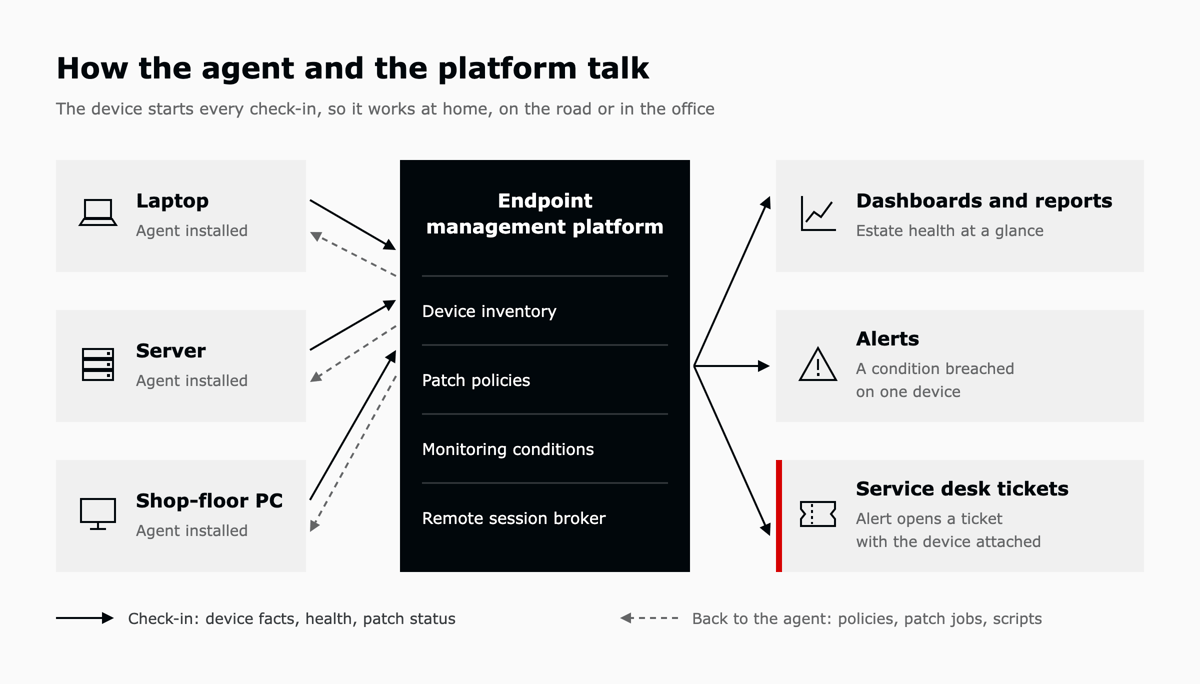
Some devices cannot run an agent, including many printers and network appliances. These are usually monitored over the network, which reports health and availability with less detail than an agent provides.
Endpoint management holds the facts about devices, and the service desk holds the facts about people and their requests: who reported a problem, what it is stopping them from doing, how urgent it is and whether it is on track. A hardware issue usually needs both. With an integration, an alert can open a ticket, the device details appear inside the ticket and the technician can start a remote session from the same screen.
The NinjaOne integration for Zendesk, launched in April 2025, works this way: alerts detected in NinjaOne create Zendesk tickets, and device information is shown alongside the ticket.7 Deciding which system owns which record is the next step, covered in running the endpoint and the service desk as one system.
A team can start by counting what it has. Installing the agent across the estate and comparing the result with any existing asset list often shows gaps, such as devices missing from the records or records for devices that have been retired.
Next, the team agrees how patching will work: which devices form the pilot group, how often the cycle runs and when the maintenance windows fall. Pre-authorizing routine patching as a standard change under Change Enablement keeps the approval step light.
Monitoring can then begin with a few conditions, such as low disk space, security software switched off and devices not seen for a week. Routing those alerts to the right support team as tickets, with the device attached, means the response does not depend on someone watching a dashboard.
It is how IT keeps track of company devices, keeps each one updated and healthy, and fixes problems remotely, using one platform and a small agent on each device.
Mobile device management is one part of endpoint management and focuses on phones and tablets. Endpoint management also covers laptops, desktops, servers and network devices.
Endpoint management gathers live facts about devices. IT asset management adds cost, contract and lifecycle information so each asset can be managed from purchase to disposal.
RMM (remote monitoring and management) tools focus on monitoring, patching and remote access, and are used by managed service providers and internal IT teams. Endpoint management is the broader discipline, which also covers inventory, mobile devices and policy, so an RMM tool delivers part of it.
NinjaOne holds the device record and Zendesk holds the request, and NinjaOne's Zendesk integration connects the two. L5 offers Zendesk and NinjaOne as one operated bundle on AWS Marketplace, so a team buys both under one contract against its existing AWS commitment. In the bundle, L5 sets up the connection between NinjaOne and Zendesk and, as the operator, tunes the automation and the data flows between them as devices, teams and rules change.
If technicians still open hardware tickets by asking which device it is, an assessment shows where your endpoint platform and service desk stop sharing data. Book an assessment and you walk away with a scorecard, a roadmap and a business case, in one week against a fixed scope.

The full article with its figures, tables and sources, set for reading offline, printing, and sharing.
On its way to your inbox You can also download it right now.
Download the PDF Last updatedKeep reading
Hardware ticket troubleshooting starts with 20 questions because the details a technician needs, such as the serial numb...
Read
Zendesk is a customer service platform that teams use to handle support tickets, conversations, and self-service in one ...
Read
Zendesk implementation, sometimes sold as implementation services or Zendesk consulting, is the work of configuring Zend...
ReadField notes on AI operations and service management, direct to your inbox. New insights, the week we publish them.
No spam. Unsubscribe any time.